iPhone Rounds Guide
The Rounds tab is everything you have played, from every source MyGolf knows about — rounds you tracked in the app, scorecards synced from your clubs and from Golf GameBook, eBirdie, Golf Pad or TrackMan, and tee times that were booked but never scored. One round, one card, however many places it came from.
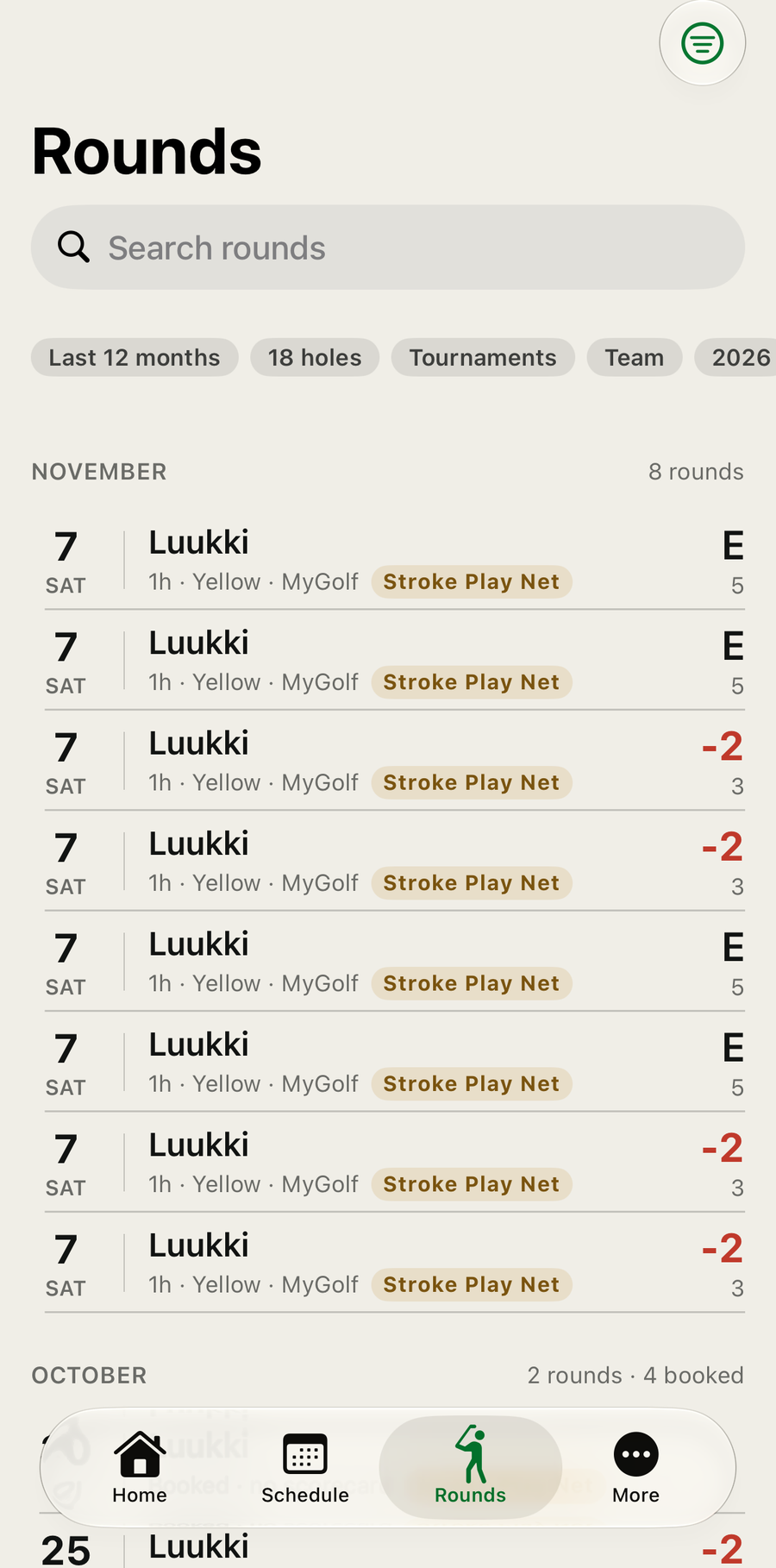 A logbook: a search field and quick filters on top, then the rounds grouped by month — date, course, holes · tee · source, and the score to par as the big number with strokes small beneath it; a booked round reads “Booked · no scorecard”. This account has too few scored rounds for the form strip, which appears above the filters once you have at least three scored 18-hole rounds.
A Golf GameBook round played on a card GameBook has since retired shows its club and course once we have linked that card, scored on the holes and stroke indexes it was played on (an old card that differs from today's is kept as a past version of the course, never offered when you start a round).
Scramble, greensome and other one-ball team rounds are listed but never counted in the form strip or a month's average and best: that score is the team's ball, not yours.
1. The list and filters
Form — the strip at the top draws your last ten scored 18-hole rounds, one bar each, newest on the right, with their average to par and how that compares with the ten before. It needs at least three such rounds to appear.
Quick filters — a grey period chip first (Last 12 months by default; tap it to open the filter sheet), then 18 holes, Tournaments, Team and the current year are chips under the strip; tap to toggle. They are the same switches the filter sheet has.
Months — rounds are grouped by month, newest first; each month's header says how many rounds it holds (bookings with no scorecard are not counted; they show as N booked) and, for its scored 18-hole rounds, the average and best score to par. Within a month the list is newest first and loads more as you scroll. A round that came from a booking and was never scored is listed as Booked · no scorecard, with no score.
Pull down on the list (or tap the search field at the top) to search by course or club name — it narrows whatever is already loaded, on top of any filter below. Swipe a row left for Hide (always) and Delete (only rounds that were created in MyGolf — a synced scorecard can be hidden, not deleted). If a delete is refused the app tells you why and keeps the round: see When a delete is refused below.
If the list came from the phone's own copy because a refresh failed, a quiet line above the form strip says so — Couldn't refresh · showing what the phone had at 14:05 — and disappears once a refresh succeeds. Pull down to refresh.
Tap the filter button in the top-right corner for the full set:
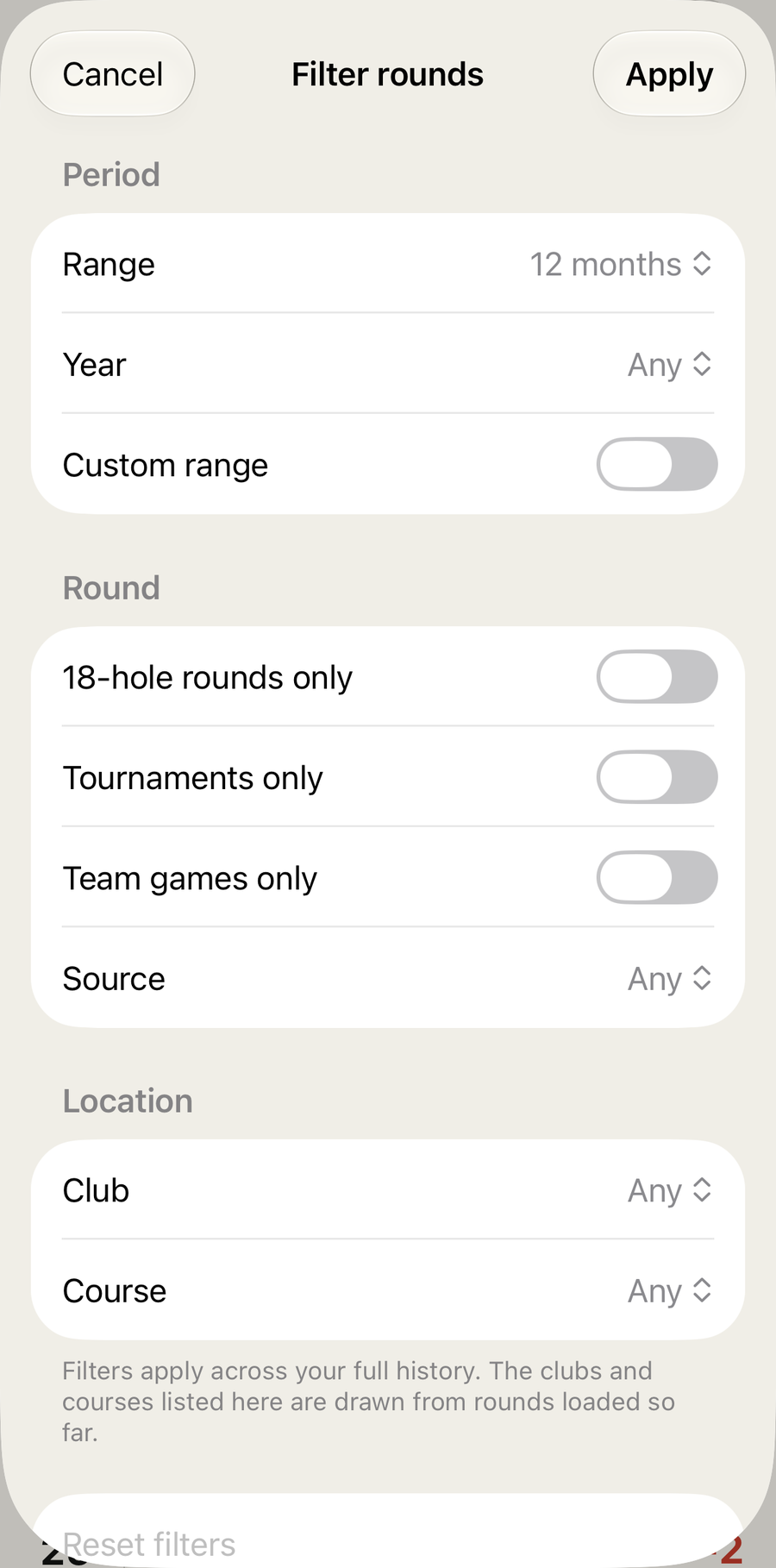
- Period — Range: 3, 6 or 12 months, or All time; a single Year; or Custom with a From and To date.
- Round — 18-hole rounds only, Tournaments only, Team games only, and the Source the round came from.
- Location — one Club. The clubs on offer are drawn from the rounds loaded so far.
Apply filters your whole history, not only the cards already on screen; the filter icon fills in while a filter is active. Reset filters, the last row of the sheet, clears everything; Cancel and Apply are the two buttons at the top.
Swipes on this screen
| Row | Swipe left | Swipe right |
|---|---|---|
| A round | Hide · Delete (only rounds created in MyGolf) | — |
Hidden rounds
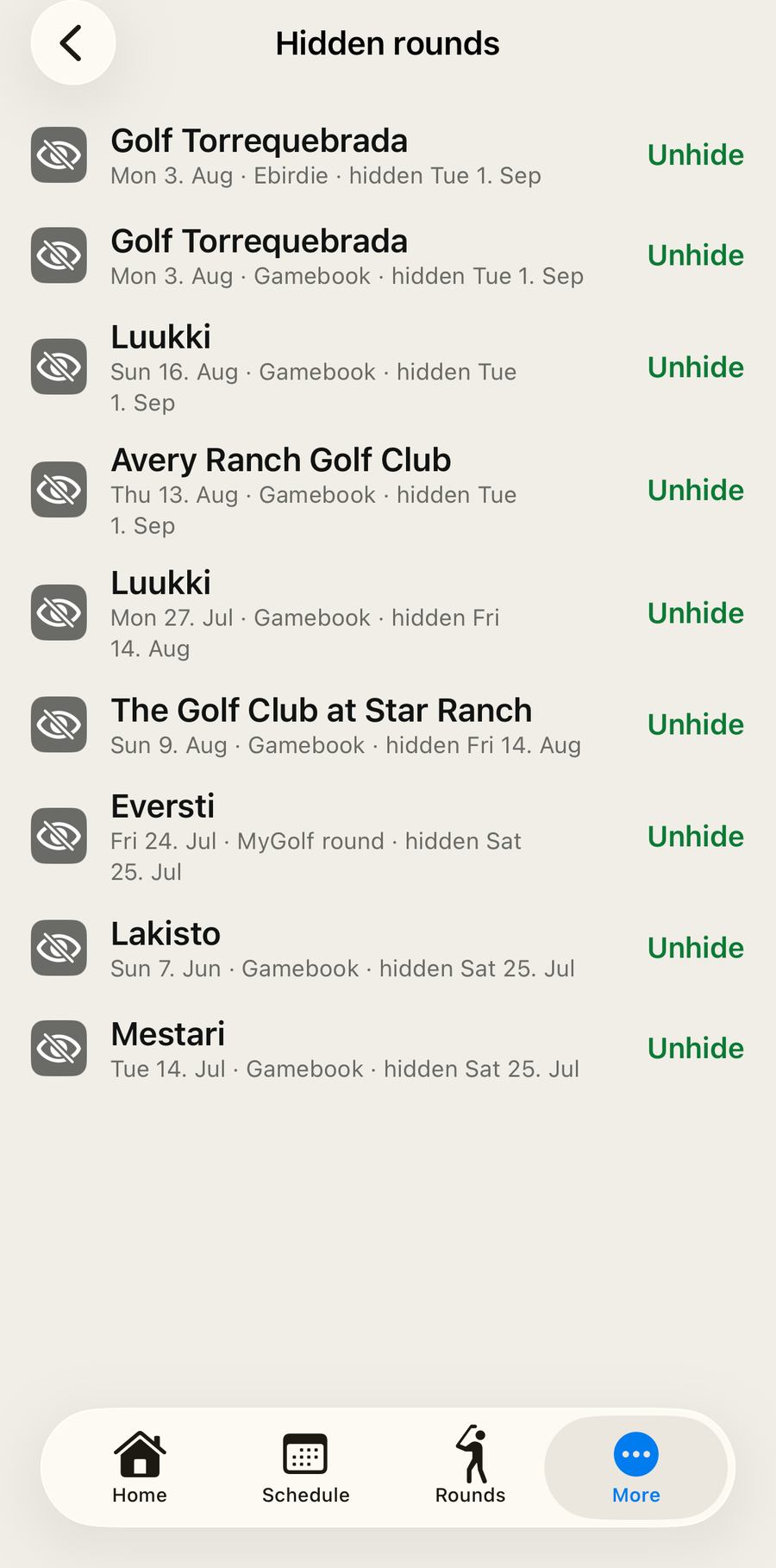
A hidden round drops out of the list and out of your stats, without being deleted. To bring one back, go to More › Settings › Hidden rounds: each row names the round's course, with its date, its source and the day you hid it beneath, so you can tell which one Unhide restores. If the list cannot be loaded the screen says so with a Retry — "No hidden rounds" always means exactly that.
2. Round detail
Tap a card to open the round:
 A round that was booked and played but has no scorecard yet: the header, the flight, the weather, and Manage round.
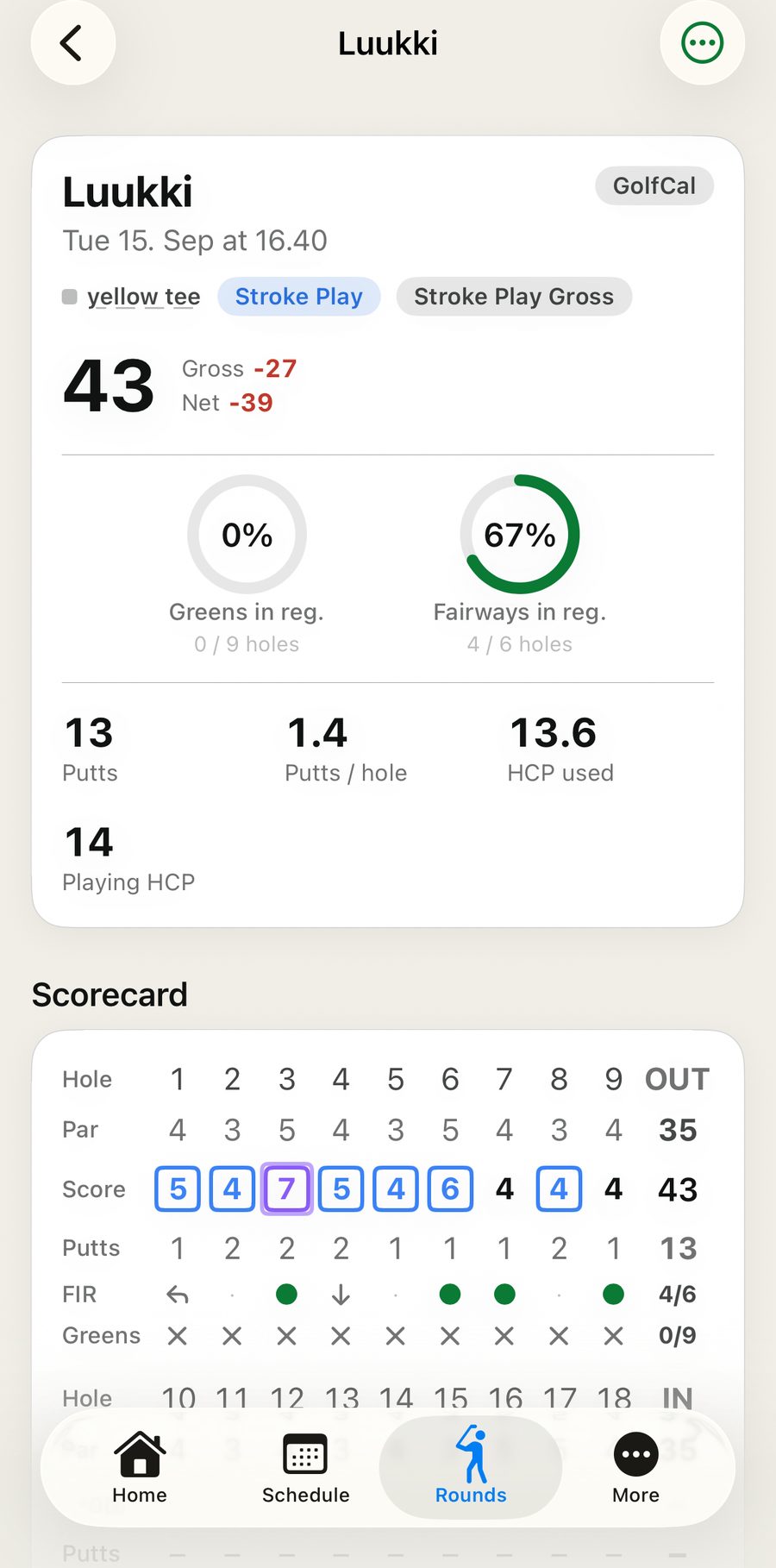
- Header — course, date and time, and on the next line the tee you played with its course rating and slope when they are known ("Yellow tee · CR 70.6 / Slope 129"), with the source in the card's own top-right corner; below that, when the round has one, the game format written out with how it was played — "Greensome · Net", "Stroke Play · Gross" (net means handicap strokes were given, gross that they were not; it follows the round's own settings, so a scramble played off scratch reads "Scramble · Gross"). The strokes figure is what you actually played — a 9-hole round shows its nine-hole total, not the 18-hole equivalent used for the handicap submission. In a scramble or greensome it is the team's one ball, whoever's card the scores were entered on, so every member of the team sees the same total. The big figure follows how the round was scored. In stroke play it is always your strokes — say 29 — with your score to par beside it in colour and the par of the holes you played under that (Par 27). On a round played off handicap the figure beside it is your Net to par (−1); on a scratch round it is your Gross to par (+2). A handicap round never shows the gross to par. Your net takes your handicap strokes on your own stroke index: a woman's on the course's women's index (the men's on a hole that has none), on a round you tracked in MyGolf and on one imported from GameBook, eBirdie or another source alike, so it matches the web round page. A Stableford round leads with your points (net or gross), match play with the result from your side ("3&2" under Won or Lost, "AS" under Halved), skins with the skins you won and, when the game had a stake, your balance. In match play, Stableford, skins and team games the headline shows the result and nothing else: no Net, Strokes or Par lines. When the round belongs to an event or competition that awarded points for it, those points sit as a second figure of the same size beside the result ("1DN" then "0 points"; "1 point" for one); a round you started yourself shows the result alone, never "0 points". In stroke play, under your strokes come your to-par (Net, or Gross on a scratch round) and the Par. In a team game the team's figure leads — a team score to par in colour, red under par — and beside it sits You with your Net (or, scratch, Gross) to par over the Par — your strokes are in the Score figure below. In a scramble or greensome it is the team ball's: the ball's strokes big, the team's net to par beside them and the Par under — and nothing personal. When the round earned event points, the headline is the ball's strokes and those points only, without the Net and Par. Counts to HCP appears only when your official handicap system (eBirdie, GolfBox) reported that the round counted; a round you tracked in MyGolf never counts, because MyGolf does not submit scores. Below that, a block of four figures, two to a row, each with a small picture on top: Score — your strokes and bars for how many holes you made birdie or better, par, bogey and double or worse (the score to par is in the headline above); Putts — the total, bars for holes of one putt or fewer (a chip-in counts there), two and three or more, and putts per hole; then Fairways in regulation and Greens in regulation, each drawn as an X: the number in the circle where the lines cross is how many you hit, and the four V-shaped spaces around it are the misses — left and right on their own sides, short at the bottom, long at the top (a zero shows as a faint 0). Fairways has no long miss, so its top space stays empty. Under each X is the hit percentage and how many holes counted — the same figures as the scorecard's Fairways and Greens rows (fairways count only par 4s and 5s). A figure you never tracked is simply left out and the rest close up; then Differential, HCP used (your index at the time) and Playing HCP (course handicap on that tee) where they apply — match play and skins show only Playing HCP, and there is no Differential for a round of fewer than 9 holes, because the handicap system has none. Holes played and the raw net score aren't repeated here — the scorecard right below already shows both. On a team round all three are hidden: each describes one player, while the score above them is the team's. In a scramble or greensome there is only one ball, so there is no personal round to have a differential for — and no personal putts, greens or fairways figures either, since the team's ball is nobody's own: the greens and fairways X's there are your team's ball, marked Team ball; in a best ball or a marty you played your own ball, so that differential is real and still counts toward your handicap — it just isn't shown next to a team total.
- Scorecard — every hole with par, stroke index, strokes and putts, OUT / IN (in Finnish ULOS / SIS.) and totals; the row labels, such as Counts, SI and Net on a team card, follow the app language. Each score sits in the same mark on every scorecard in the app: an eagle or better in an orange-yellow circle, a birdie in a red circle, a par as the plain number, a bogey in a blue square, a double bogey in a purple square and a triple bogey or worse in a black square. Your own card comes first, right under the summary, and the card you share with the rest of the round — the group card, or the flights and teams — follows it; only in a scramble or greensome, where the ball is the team's, does the team card lead with no card of your own. Your card shows hole, par and stroke index, your score, putts, fairways and greens — a ✓ for a hit, an arrow for which way you missed (← left, → right, ↓ short, ↑ long), × for a miss with no direction, and nothing on a par 3 or a hole you didn't track — a Bunker and a Pen. row on every round you tracked stats for — "–" on a hole with nothing in the sand and no penalty, the mark or the count where there was, and the nine's count (0 too) under OUT / IN — and your game's own row: Net (−1, E, +1) in net stroke play, net skins, net match play and the Marty, Points in Stableford and the Marty, Skins in skins, and Match (1UP, AS, 1DN after each hole) in match play — Points, Skins and Match drawn as large as your scores, Net smaller. Each nine has its OUT / IN total, and the card ends with your Tot and Net; when the card has a Net row, that closing Net is the row's own total, so a Net row adding up to +1 closes with Net +1. Under each player's strokes the card shows one row in the team's own currency: on an Irish Rumble, best-ball or shamble card that is Net — the player's net-to-par on each hole (−1, E, +1 …), the very numbers the Team line adds up, with the strokes that counted underlined; on a team Stableford card it is Points. No scorecard has a Net column: a Net row's round total, a points total and a team's total all sit under Tot, and your own card still closes with your Tot and Net. A round scored in points (a Marty, team Stableford, a scramble on Stableford points) still gives each player a Net row under their strokes. On a Marty, where each squad has a player in every flight, the card is grouped by flight: every player row carries a dot in their squad's colour and, under it, a Net row (your own net score to par each hole — −1, E, +1 …) and then a Points row (5/3/1 per hole against their flight-mates). The net comes first because it is the line you recognise; the points are what it earned — a 2 on its own doesn't say whether the hole was a birdie or a scrambled par. A strip above the card gives each squad's total, leader first; open a squad and its heading carries its points ("Squad Red · 62 pts") and its Team row adds the members' points hole by hole. Names on the card are short — the first name, plus the family-name initial only when two players share a first name. Under every team ball there is a Net row — the ball's net score to par on each hole (−1, E, +1 …) and in total, as the server allocated the team's handicap strokes — and on a scramble played for Stableford points the team's Points row follows, with the team's heading showing its team playing handicap and points. Once the round is finished, each scramble or greensome ball also shows its own Putts, FWY, GIR, Bunker and Pen. rows (only those with data) — taken hole by hole from the player whose score holds the ball there. They appear on the team's own card (open its Teams row, or its flight row when the flight is one team); a flight card holding several balls shows the game alone — hole, par, stroke index, allowance, strokes, Net and the match state — with no stat rows. Every card's header carries the hole's stroke index (SI, HCP in Finnish) under Par, on the front and the back nine: the course's own index, the one the handicap strokes (the dots beside a score) are given on — on a round played by women the women's index, and on a round of men and women whose indexes differ both rows, SI men and SI women. A hole the course has no index for shows "–". They are the ball's figures only: nobody's personal stats include them. In best ball, where everyone plays their own ball, your own card keeps your personal stats instead. A scramble's or greensome's ball row is labelled Strokes (Lyönnit in Finnish), above its Net row. A hole that was not played has no Net: where the strokes row shows "–" (hole 18 after a match ended 2&1 on 17) the Net cell shows "–" too and the Net totals leave that hole out. The Net totals (Out, In, Tot) are in the same ink as the other totals. A stat row nobody recorded anything in (say Putts, Bunker or Pen. when none were entered) is left out of the card; a row with any value stays. A team of more than two players shows no list of names in its heading, only its handicap; a pair keeps its two names. Each player's name row — the one with their strokes, or a team's ball — sits on a soft green band, so every player's block starts clearly; the rows under it (Net, Points, Putts, Fairways, Greens, Pen., Bunker) alternate a faint grey shade and none, and every even-numbered hole's column carries a lighter shade down the card, on every scorecard in the app, so you can follow a hole through the rows. In match play with handicap each player has a Net row, so two equal scores with different nets show why the hole went one way, and each player's Net total is their Net row's sum, under Tot. A hole you picked up (marked no score) is conceded in a match: your opponent wins it, or it is halved when both sides picked up, and it counts as played. A flight that starts on the 10th plays its match from there (10 to 18, then 1 to 9), so the match closes when the lead is bigger than the holes left in that order. Match play is the one game whose Net rows show net scores ("3", "4") rather than net to par; in every other game, team games included, a Net row reads "-1" (red), "E" or "+1" and adds up the same way. On iPad the card is drawn larger to use the width. The note about underlined strokes appears only when some stroke is actually underlined. A side game (say, Stableford played alongside) is not in that row — it has its own section further down. On a round you tracked in MyGolf, a skins game gives each player a Skins row: the skins they won on each hole, with a carried skin counted in the number, and their total. Skins played with handicap, and match play, add a Net row too — the net score to par each hole was decided on. A stroke-play round gives each player a Net row (net score to par, hole by hole). This is the same row the Card tab shows during play. The card shows every player's strokes, guests and players without an account included, just as during the round; with the card there, the results list does not repeat it hole by hole. Your own scorecard keeps your putts, fairways, greens and other tracked stats in every game where you play your own ball; only a scramble or greensome, where the ball is the team's, leaves them out. A tracked round with several flights or teams opens its group card the way the Card tab showed it during play: one folded row per flight (yours open) with how far it got, the playing handicap of each player on it ("thru 7 · Alex 8 · Blair 14", or the team's playing handicap for a scramble ball) and its score, then the teams in standings order (in a trip, the squads, each with the points it earned in this round on its right — "2 points", 2 pistettä in Finnish — and no figure when it has none; the points on a flight row are written the same way, "4 points", never "+4 pts"). In a trip or competition a squad keeps one colour on every round of the event. Tap a row to open that flight's or team's card. In a team game, a squad's team is named "Harem · Flight 2" in a list that mixes flights and "Harem" inside its own flight; a one-ball team also shows its team handicap and an Allowance row of strokes received per hole, above the ball, in grey ("–" where none); a team of women only receives its strokes on the women's stroke index, any other team on the men's. An opened flight or team card also says how a one-ball team's PHCP is counted, under its name: "Team PHCP 5 = 35% × 6 (Eero) + 15% × 20 (Jari)" — each player's course handicap times the game's weight, rounded once; it is left out when the organiser fixed the team's handicap or a player has none (a capture of this line is still owed). The Card tab during play shows the same line.
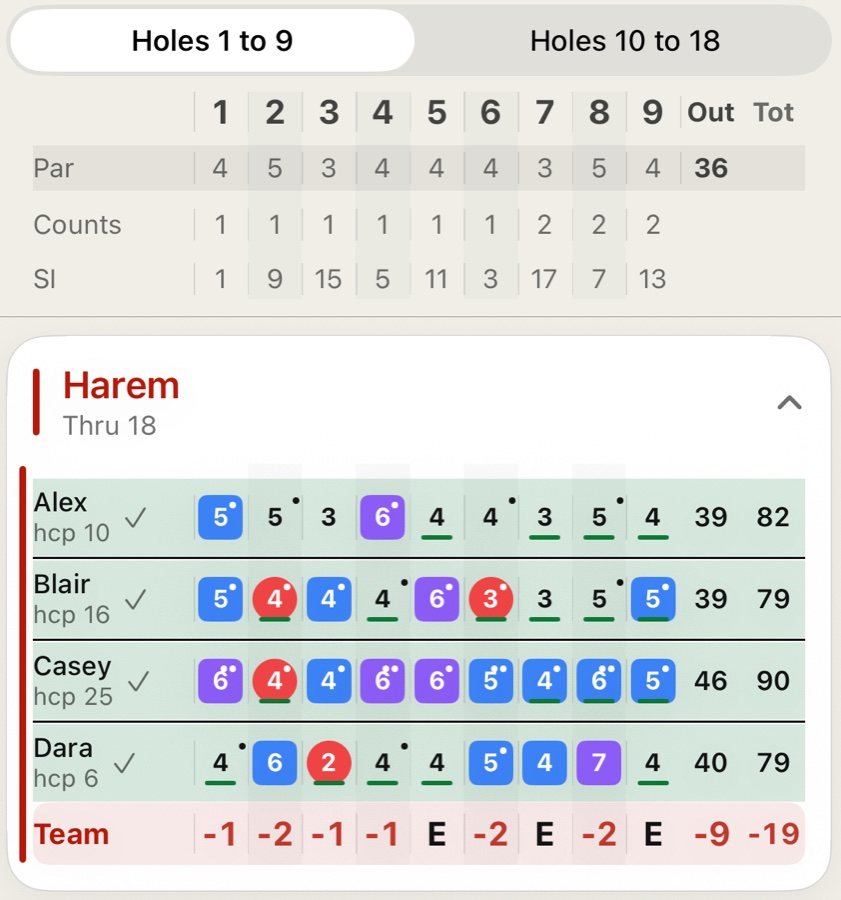 An Irish Rumble flight card on a trip round, front nine: each player's block (score row) is closed by a thin line in the text colour, the Team line under the last player adds the counted balls up (Counts row above), and the underlined strokes are the ones that counted. The ordinary round card also shows each player's Net row inside the block. Fixture data (invented players).
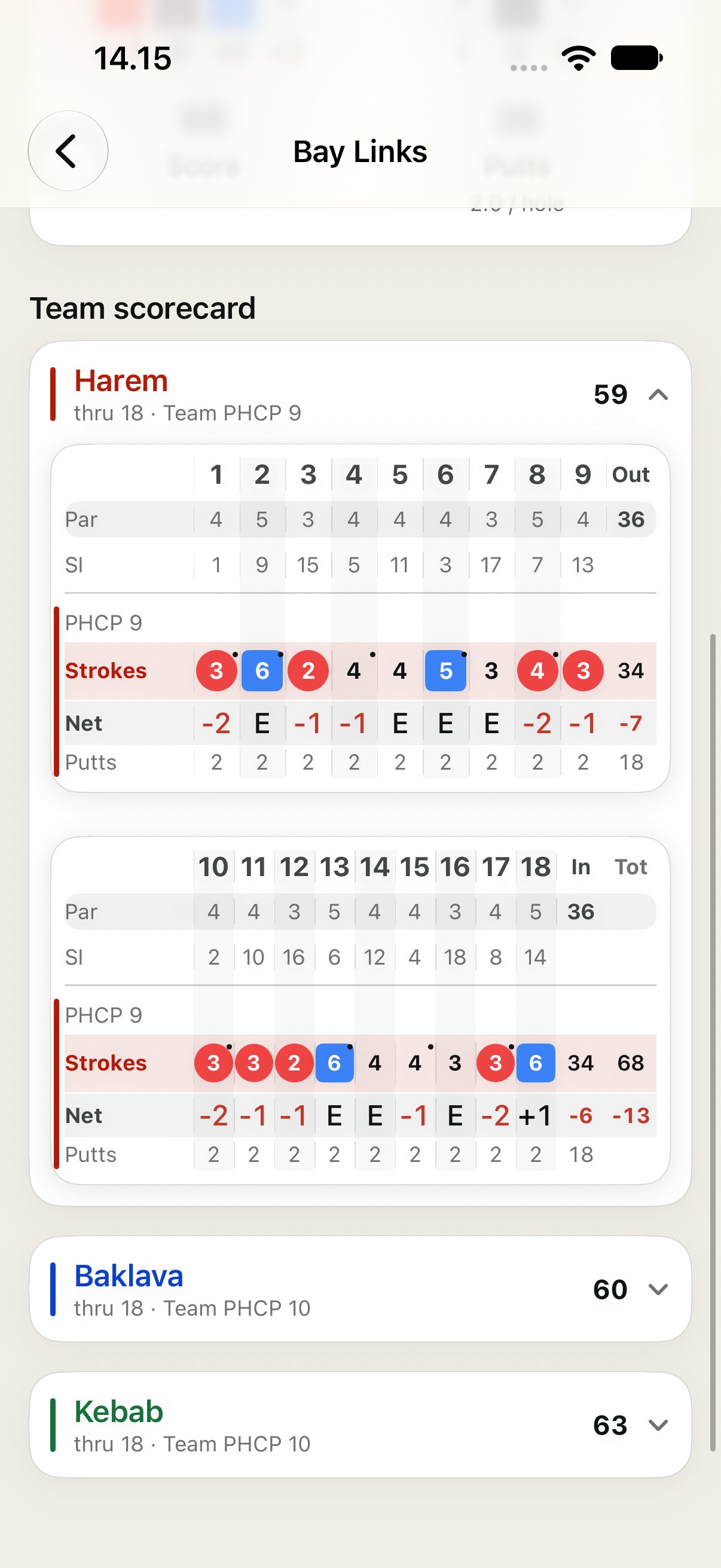 A scramble team card: the Net row below the team ball is the team's net to par on each hole ("-1" in red, "E", "+1"), its OUT / IN / Tot the sums; in a match it is the ball less the strokes the team receives ("3"). The label stays a plain "Net" ("Netto" in Finnish). There is no separate Allowance row. In match play the side that won a hole has its Net figure in a solid circle in the side's colour (every number of the side's rows is in that colour, and the strokes rows carry no birdie or bogey marks); a halved hole has no badge. In a fourball match each ball the scorer counted is marked: the winning side's as the circle, the others (the losing side's, and both sides' on a halved hole) with a short underline. A small dot at the top-right of a strokes-row number marks a hole where the side or player receives a stroke (two dots for two, up to three). A player's Net row in a match shows net strokes too, under the same plain "Net" label; in net skins and the Marty it reads to par. Fixture data (invented players); a capture of the squads rows with their points is still owed.
- Scorecard source — when the same round arrived from more than one place (say, Golf GameBook and eBirdie), the control in the header's top-right corner shows which scorecard is being used and lets you pick another for this round; Use default source goes back to your global order (see the Account & settings guide). A per-round choice always wins over the global order.
- The flight's combined card — everyone who played together; tap a player for their own full scorecard (not on a one-ball team round such as a scramble, where the team card already shows everyone and there is no player card). On a round tracked in MyGolf, a small check mark after a player's name (under the name when you use a larger text size) means that player has finished their round; a player still playing has none.
- Strokes Gained — appears when the round has shot data (section 3).
- Edit shots — for a round tracked in MyGolf with shots (until the round closes); see the Shot tracking guide, section 6.
- Edit scores — for a round tracked in MyGolf once your flight's card is in (including during an organiser-run round's grace period, until the round closes): fix a hole's strokes after the round. It lists only your own flight (everyone on an unflighted round). Each hole row names its par beside the hole number (Hole 3 · Par 4), so you can tell a par 3 from a par 5 as you correct a score.
On a group round the group may not take a player's scores (they have not shared them): Save then says Some scores weren't saved: and names the players; the other holes are saved, and your corrections for the named players stay on screen. (Invented players; the layout is the app's.)
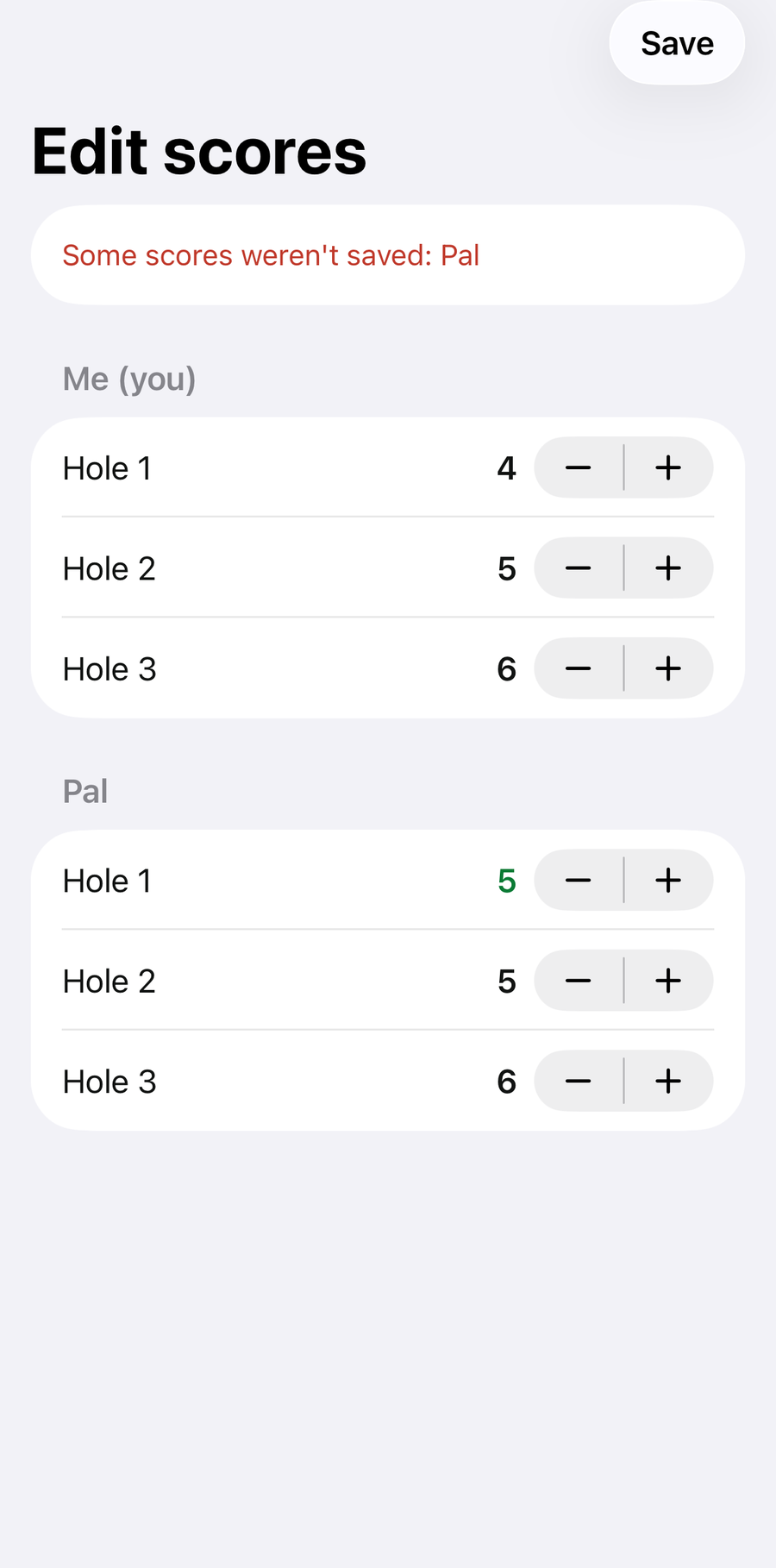
When an organiser-run round closes, Edit scores, Edit shots and Reopen round disappear and a closed line (Closed at 14:30, Closed by the organiser, or This round is closed) shows where the edit links were. If the round closes while you have an editor open, Save in Edit scores shows This round is closed, and a refused shot edit shows This round is closed with Your last change was not saved.
- Results — the format's standings and any side game. If the round has no game results the section is simply not there; if it has some and they could not be fetched, the section says Team scoring couldn't be loaded with a Retry — the two never look the same. Equal totals share a place in every format (totals 70, 70, 72 are placed 1, 1, 3), and a halved match places both sides first. Event points given by place work the same way: everyone tied gets the full points of that place (two tied for 1st on a 10-point table both get 10); only the Marty splits its points between tied players. A skins count reads "1 skin" or "2 skins". A nine-hole round played on an eighteen-hole course is scored over its nine only: the other nine are not listed as missing.
- Workout — how long the round took (Elapsed: first to last shot on a shot-tracked round, otherwise start to close) and, when your Watch recorded the round or you imported it from Apple Health, the energy (Active, with the total beside it), Avg HR, Max HR and the Distance walked. A reading the workout doesn't have is left out; with neither an elapsed time nor a workout the section isn't there. Under five minutes doesn't count as an elapsed time — a round scored afterwards, or opened and closed straight away, shows none. Shown on your own rounds only. The energy, heart rate and distance need your Apple Health choice (asked the first time you start a round, and in More › Settings › Apple Health): Save rounds as workouts lets the Watch record them, Show stats in MyGolf lets MyGolf read them from Health for the round's time. With neither, the Watch workout shows only how long it took.
- Players (· you marks your own row; a star marks a golfer you follow; not shown on a one-ball team round such as a scramble), Weather (the forecast at tee time, wind in m/s) and your Notes from a hand-entered round.
- Manage round — Hide from my rounds (reversible, see section 1), and for rounds created in MyGolf Delete round (permanent) and, while it is still marked completed and not closed, Reopen round (only on the day the round was played; on a later day MyGolf says so — use Edit scores to fix a score instead). The ••• menu in the top-right corner has the same three.
Deleting a shared round. Anyone on the round can delete it. If nobody else has scores on it, it is deleted. If someone else has scores, Delete only removes you: your scores stay with the group and the round carries on for the others. A player on the round is never refused.
When a delete is refused. Delete never fails quietly, in the list or on a round's page. A banner appears at the top of the list (or of the round's page) saying what happened, and the round stays until the server has really deleted it. Tap the ✕ on the banner to dismiss it:
- You are not in this round. Only players on a round can delete it.
- This round was already deleted. It is gone from the server; the app removes the stale row from your list.
- Couldn't reach the server, so nothing was deleted. You are offline or the server had a problem. Tap Retry when you are back online.
3. Strokes gained
Strokes Gained › Per-hole & shot detail opens the round's strokes-gained breakdown. It needs shot-level data — a round tracked in MyGolf, or synced from Golf Pad or another shot-tracking source.
- Benchmark — the skill level you are measured against (scratch, 5, 10, 15 or 20 handicap). Everything on the page is "vs benchmark".
- Highlights and the total strokes gained for the round.
- Hole by hole — one row per hole with the strokes gained on it. A hole with a guessed shot position shows "—" instead of a number, with a short explanation if you ask for it; a caption near the total reads "SG based on N/M holes" when any holes are left out this way.
- Shot map — the round on the course, every shot drawn. A dot marked with a small "?" is a guessed position, not a GPS fix; the line into and out of it is dashed to show it's a guess.
- Shots — each shot with its start distance (in metres, like every other distance in the app) and lie → end lie and its strokes-gained value, so you can see which shots cost the most. A guessed shot shows "Position estimated" in place of that detail.
4. Tournaments
When a finished round's skins game had a stake per skin, a Settle up section lists each player's net result (+/−), the fewest payments that square it ("Casey pays Alex €4"), and any skins still carrying after the last hole. Those skins are void, for example "2 skins unclaimed, holes 17–18". This is a ledger only: MyGolf doesn't handle payments, so you settle up yourselves. The web round page shows the same section.
A round that was part of a multi-flight competition carries a View tournament link under its header. The tournament page shows the standings across all flights (or teams, in a team format), then each flight's combined card, and tap-through to any player's scorecard. When the format carries a skins side game its leaderboard appears on the round itself.
5. Hand-entered rounds
A round that was never booked through a club is added from the Schedule tab: + › Golf round — pick the course, the tee time, the players and optional notes (see the Schedule guide, section 4). Once played and scored it appears here like any other round, with your notes under Notes.
Viewing a nine-hole round on the web
When you open a tracked nine-hole round on an 18-hole course in the classic or beta web detail, the scorecard shows only the nine selected for the round (1–9 or 10–18). Scores stored on the other nine do not appear or contribute to gross, to-par, net or the card’s statistics. Full 18-hole rounds keep both nines. This also applies to each player in a shared round.
Private My notes per hole are available during a round on the Play tab and at the lower left of the satellite Map tab (Android planned), sharing your notes with the course pages and OurGolf. See My notes per hole and the Shot Tracking guide.