iPhone Score Tracking Guide
If you'd rather not tap before every shot, Score tracking lets you enter each player's strokes and putts — and as many stats as you like — at the end of every hole. Your phone still works as a yardage book the whole way round.
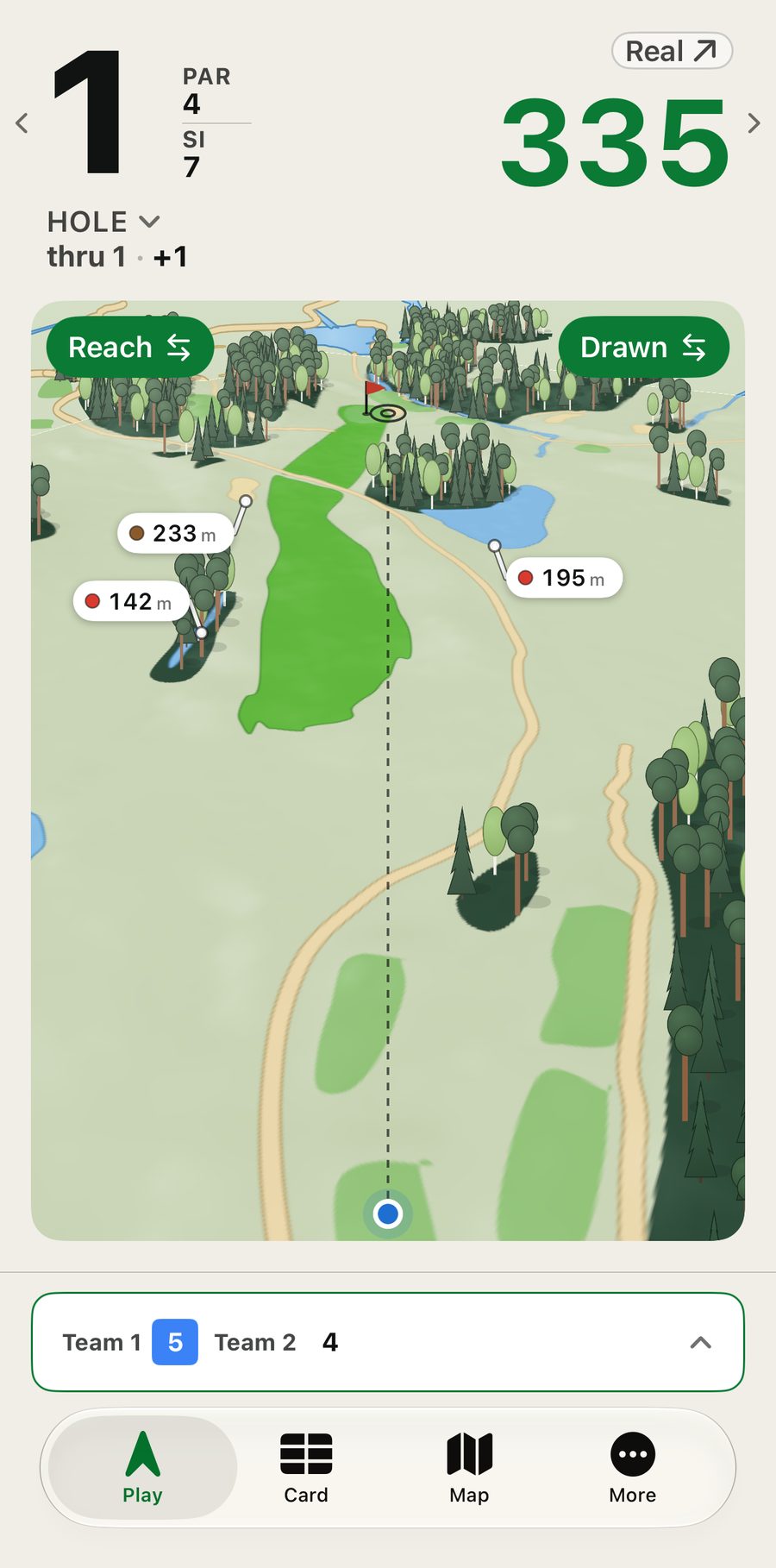
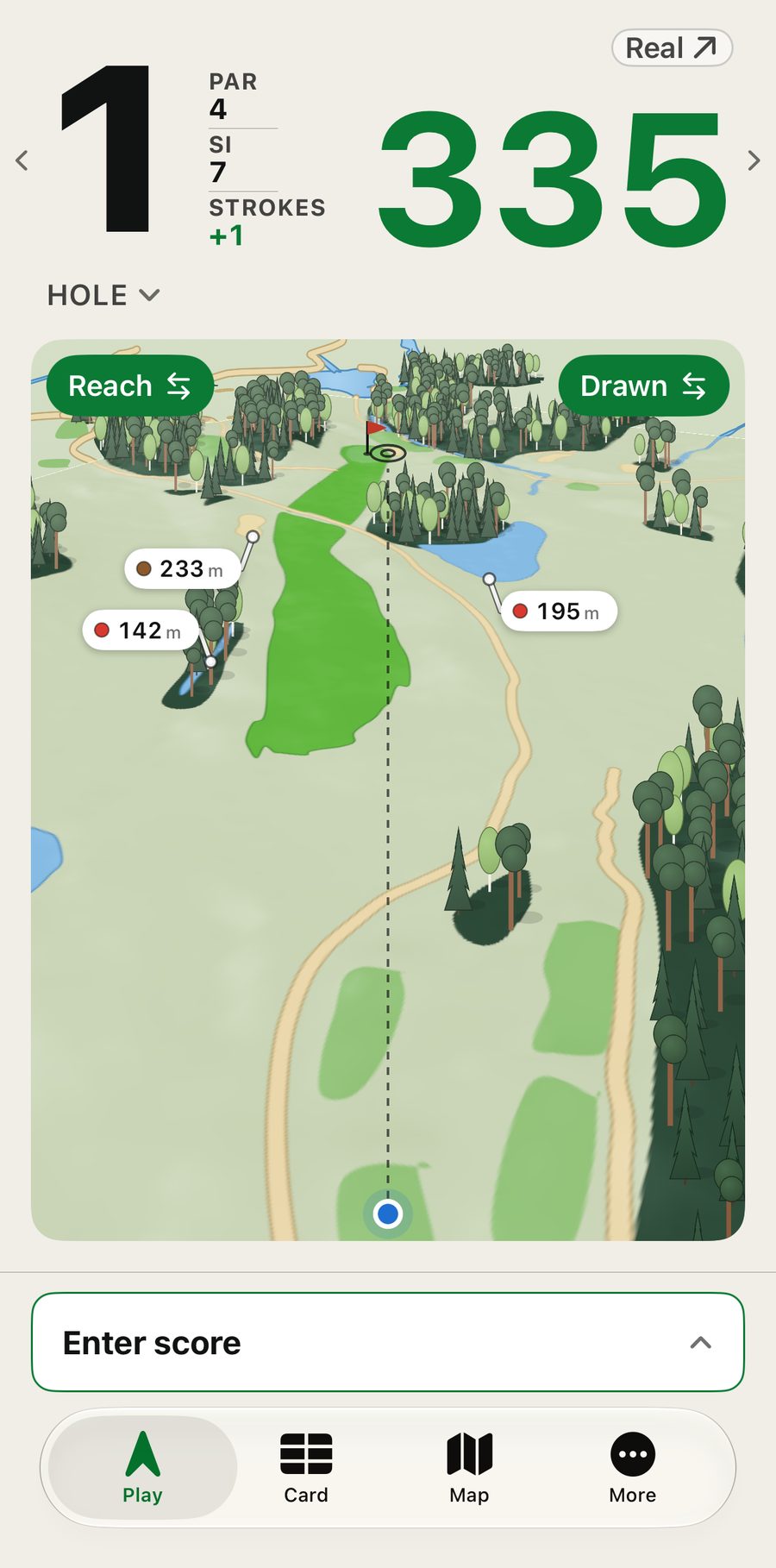 The Play tab in Score tracking: distances and hazards above, a score tile per player below.
1. The Play screen
- Swipe across the header (hole number, the Par / SI / strokes stack and the distances) to change hole — left for the next, right for the previous — or tap the big hole number to jump to any hole; a small grey ‹ › in each margin of the header hints at the swipe and moves a hole when tapped; beside the number, PAR, SI and STROKES (the strokes you get on this hole, nothing when none), and under it HOLE ⌄ and your running score (thru 6 · +3). Edit round is reached from the Card tab's ⚙︎ or from Home (section 6). Android has the same header: the ‹ › and the swipe wrap around at the ends of the round too, and Round settings and the round options menu (⋮: Start again, Leave round) are at the top of the Go to hole sheet.
- Go to hole (tap the hole number) lists every hole in two vertical columns (OUT on the left, IN on the right) on an 18-hole round, separated by a vertical line and topped with each nine's par and live score subtotal. Each row shows the hole number, its par and recorded putts, and your score on the right in the scorecard mark (circle under par, square over — your team's ball in a one-ball format). A faint dash inside a dashed slot means not played yet; the current hole is outlined in green. Tap a hole to go there. The stroke index and your handicap strokes are not in this list; they are on the hole header and the Card.
- The distance to the CENTRE of the green from GPS, as the one figure in the header. Tap it for FRONT and BACK at full size and the Plays-as chip (green when on; distances adjusted for elevation, weather and head/tailwind; off in competition rounds). Under the chip, a headline gives the total (Plays as: +11 m) and one row for each input that changed the figure — uphill or downhill, cold or warm with the temperature, rain, headwind or tailwind — each with its metres, adding up to the total; a row that rounds to 0 m is left out. The wind row gives the wind along your shot in m/s (along the shot), not the wind speed. The block reads Real distances while Plays-as is off, and Plays as: no change (plus what is missing, such as no elevation or weather not loaded) when it is on but nothing needs adjusting. At the largest text size the card scrolls if it does not fit. On Android the enlarged card is a sheet that slides up from the bottom (swipe it down or tap × to close; it scrolls if it does not fit), with the same content: the Plays-as chip, then the headline and rows in small text (+4 m uphill, +3 m cold 9 °C, +5 m headwind 4 m/s along the shot), adding up to the change in the PLAYS AS figure; when the figure does change but something is not counted, a last line says so (weather not loaded or no elevation). Away from the course it reads Plays as: no change · too far from the green. TalkBack reads the block as one item, starting with the total. The header's figure reads PLAYS AS while it is on; while it is off a small Real ↗ chip takes the label's place, and tapping it opens the same card.
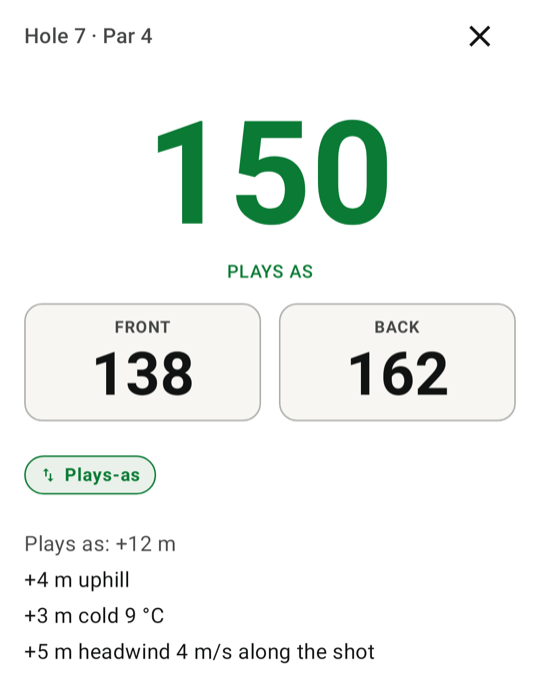 Android: the enlarged distances sheet, Plays-as on. Example figures.
- From tee — how far you are from where the first shot of the hole was struck, once a shot with a GPS position has been marked on it (it shows — while you stand on that spot, and is hidden without a GPS fix; it needs no course map).
- The hole view: a strip under the distances that draws the hole low from just behind you, with a small pill sign on every hazard that matters for the shot (its dot shows the kind: red water, white out of bounds, brown sand, green for the green; the line from the sign to its hazard is a light line with a thin dark edge, and signs keep off the green and off other hazards where there is room) (not one more than 25 m behind the green, nor one mostly hidden right behind a nearer hazard, nor one beside the green that is more than 15 m from its edge, nor one far off to the side of both your direct line to the green and the line along the fairway (more than 35 m, or 30% of its distance from you when that is more); those are drawn without a sign and left out of the hazard lines) (one number: Reach to the front edge or Carry over the back edge, chosen by the Reach | Carry control at its top left), Drawn | Satellite at its top right. The strip aims at the green when it is within your longest club and otherwise at the point a drive ahead along the fairway. While the strip shows, the distance block above it is compact (the hole number with HOLE ⌄ and your thru line under it, the Par / SI / strokes stack, and the distance to the middle of the green) and the score tiles collapse into one bar, Enter score, which opens the same score sheet on your own tile (its player chips reach the rest of the flight). When the hole you are on already has a score, the bar shows what is entered instead of the words Enter score: a small chip per player (per team in a shared-ball game) with their initials and strokes in the same circle, square or plain mark as the scorecard, and a tap on a player's chip opens the score sheet on that player (Edit score), and a tap on the rest of the bar opens yours. With Plays as on, the 35 m downhill to green pill sits in the top row of the strip, between Reach | Carry and Drawn | Satellite; on a narrow screen or at a large text size it shortens to an arrow and the distance, or disappears rather than cover a control. After you enter the last score of a hole and move on, a card at the bottom of the next hole, over the score entry and within thumb reach, shows that hole at a glance (Hole 7 · Par 3, then one box per player with their strokes in the scorecard marks, their putts (1 putt) and, in a Stableford game, their points; in a match, the result such as Harem won · 1UP under the boxes); it never stops you playing and stays until you tap OK, swipe it away, or start your next action (open the score sheet, change hole or mark a shot), and a tap on a player's box opens that player's score sheet on that hole. It appears when a hole ends without the score sheet (shot tracking, the Watch, a pick-up); leaving a hole with the sheet's Next hole button shows none. It does not show when you play alone. When you are not at the course (the distance to the green is over 999 m, say a bad location fix or the wrong hole), the distances read 999, the label stays CENTRE and no Plays as figure or elevation pill is shown. The card's reason line then reads Plays as: no change · too far from the green if Plays-as is on. The hole view is drawn from your tee once you are over 800 m from the green. (Capture owed.) In score tracking the hole view and the Enter score bar are there from the start on a hole with a course map: until the first GPS fix the strip is drawn from your tee (see Far from the green, or no GPS yet in the Shot Tracking guide), so the screen does not change when GPS locks and the bar stays under your thumb (scoring never waits for GPS). Without a course map for the hole, the full distance block and player tiles appear. Tap the green in the strip to zoom in on it (the green centred, with the pin, the surrounding bunkers and water, and the same signs as the normal view); tap it again to come back, or it returns by itself on another hole or after you move 20 m. It is the same strip as in the Shot Tracking guide, and Reach | Carry and Drawn | Satellite are shared between the two modes and remembered. (Capture owed.)
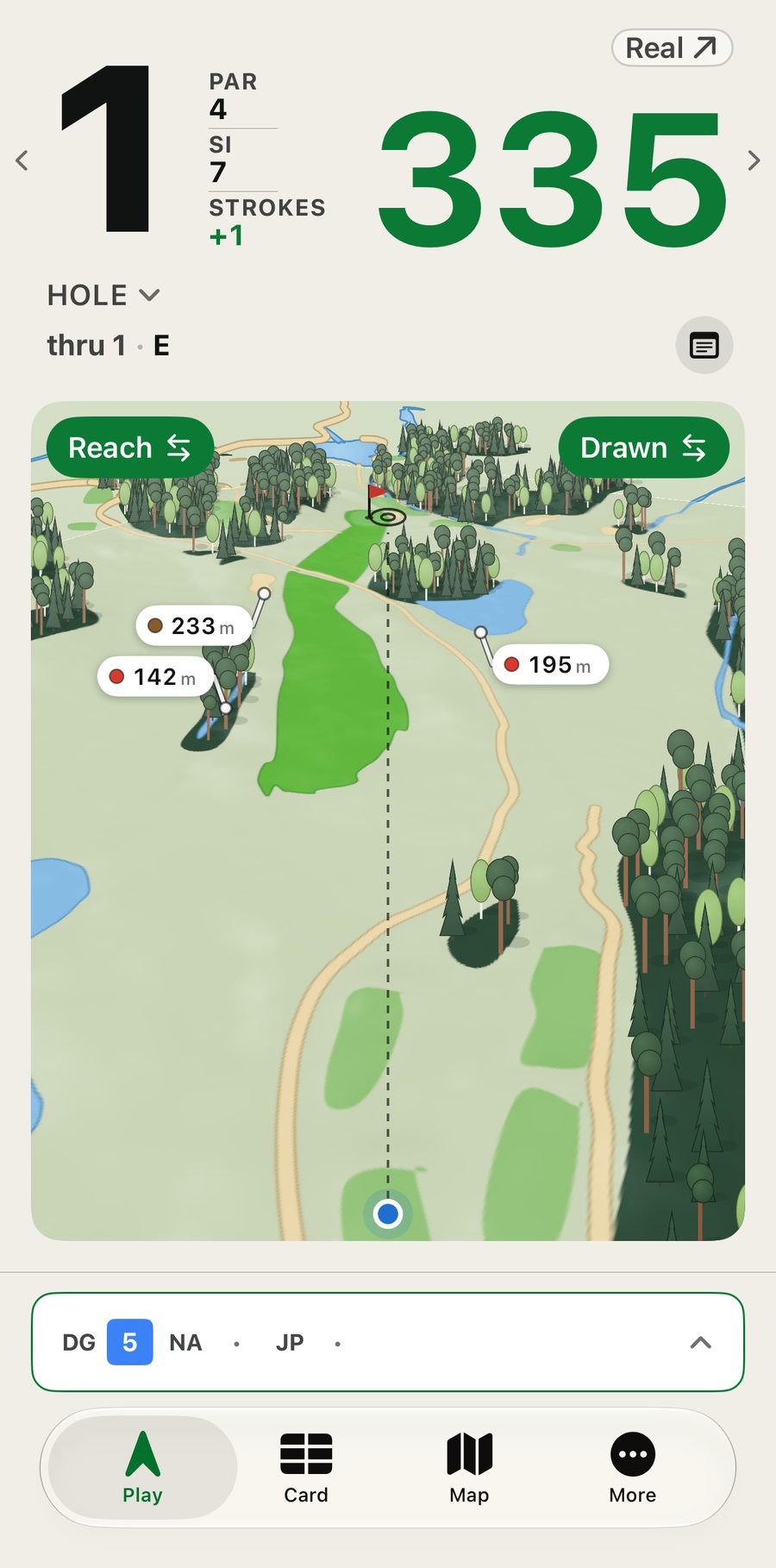 - Score tiles at the bottom — one per player (or one per team in a team format), in two columns. Each tile has the player's first name with the surname under it, and this hole's score on the right — before it is entered, the strokes that player receives on the hole (VoiceOver reads them as Receives 1 stroke, or Gives back 1 stroke for a plus handicap, not as a score); your own tile says YOU under your name. Tap a tile to enter that player's score.
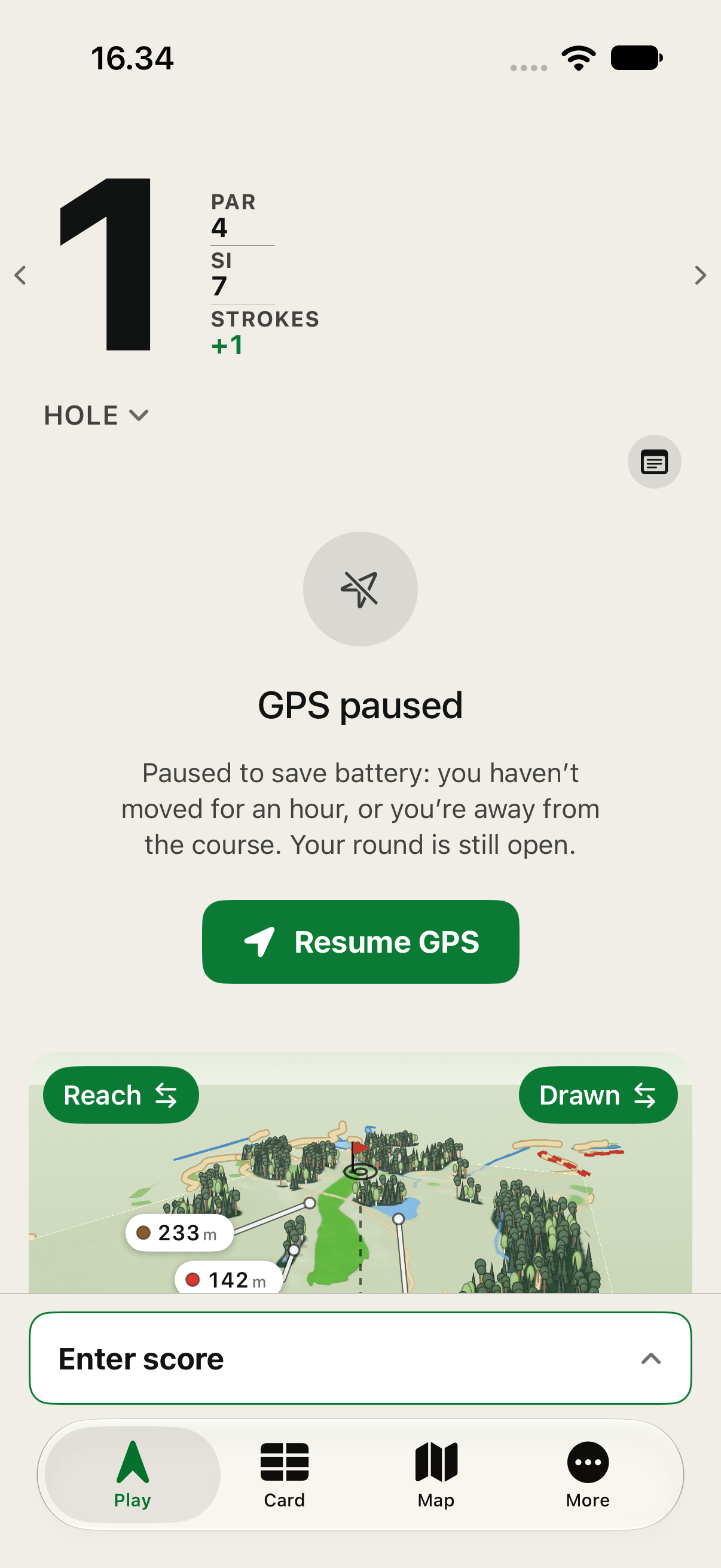
- GPS paused — to save your battery, GPS pauses by itself when the round looks abandoned: after an hour without moving (50 m or more), or after half an hour more than 1 km from the course (only on a course whose holes are all mapped). Only GPS stops: your round stays open, nothing is finished or handed in, and you can keep entering scores. The Play screen then says GPS paused with Resume GPS (the hole view strip is drawn from your tee). Opening the app again starts GPS by itself; Resume GPS does it at once. The same applies in shot tracking.
2. Entering a score
The score sheet starts with the score and adds one question at a time from the bottom, next to your thumb: answer one and the next appears under it, while the questions you have answered stay above, still editable. The questions come in the order a hole is played: strokes, tee shot, putts, then the green. A hole that already has answers opens with them and the next question; a hole with nothing left to ask shows the whole form.
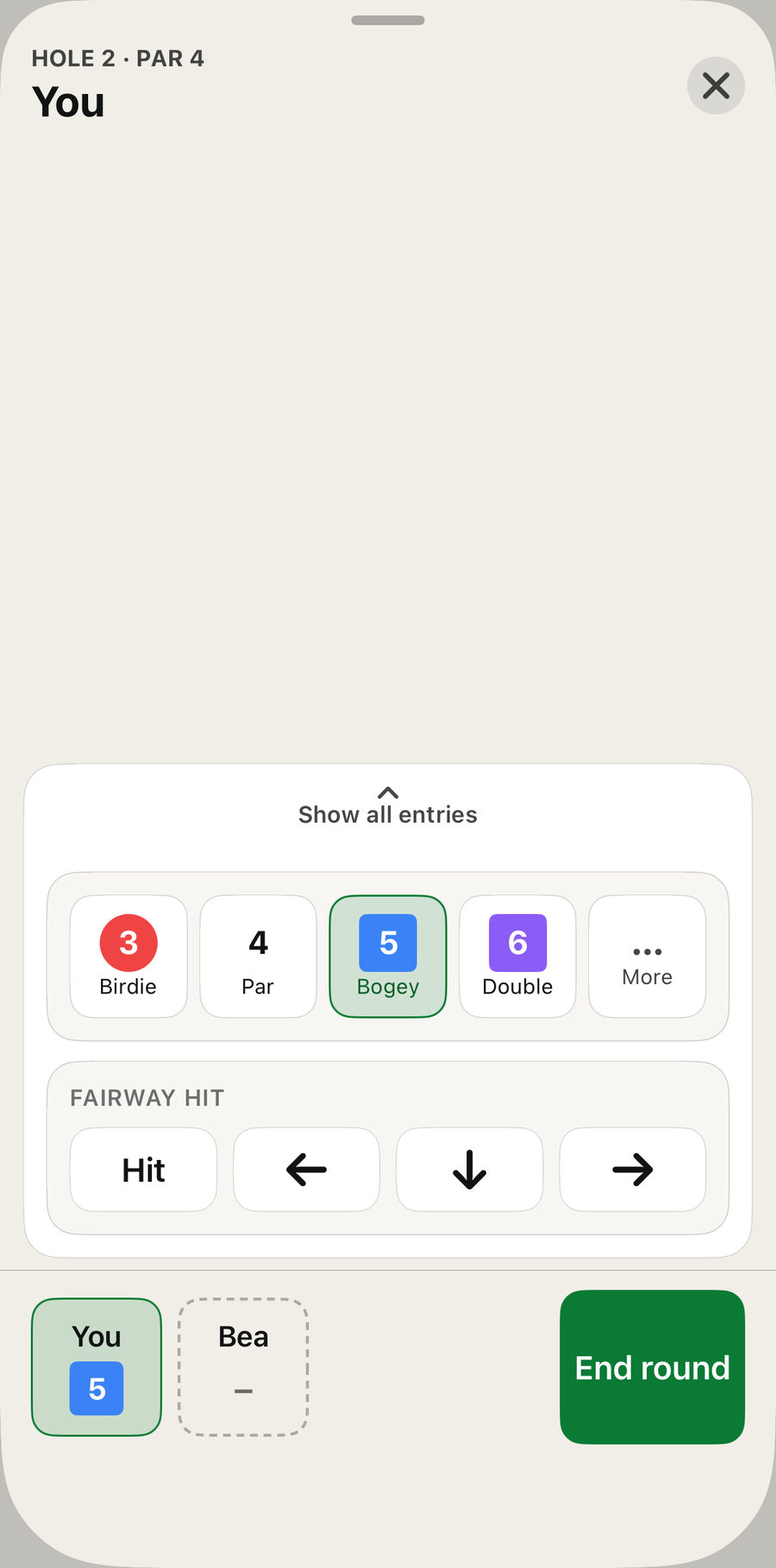
- Show all entries, just above the questions (it moves up as they appear), opens every question at once: tap it or swipe up on it. Use it to skip a question you don't know (say, the fairway) or to go straight to Penalties. It stays open for the rest of that sheet, for every player and hole, until you close the sheet. With VoiceOver it is a button and also an action on the form.
- Android works the same way (it has no card: the row sits right above the questions); TalkBack offers Show all entries as a button and as an action on it.
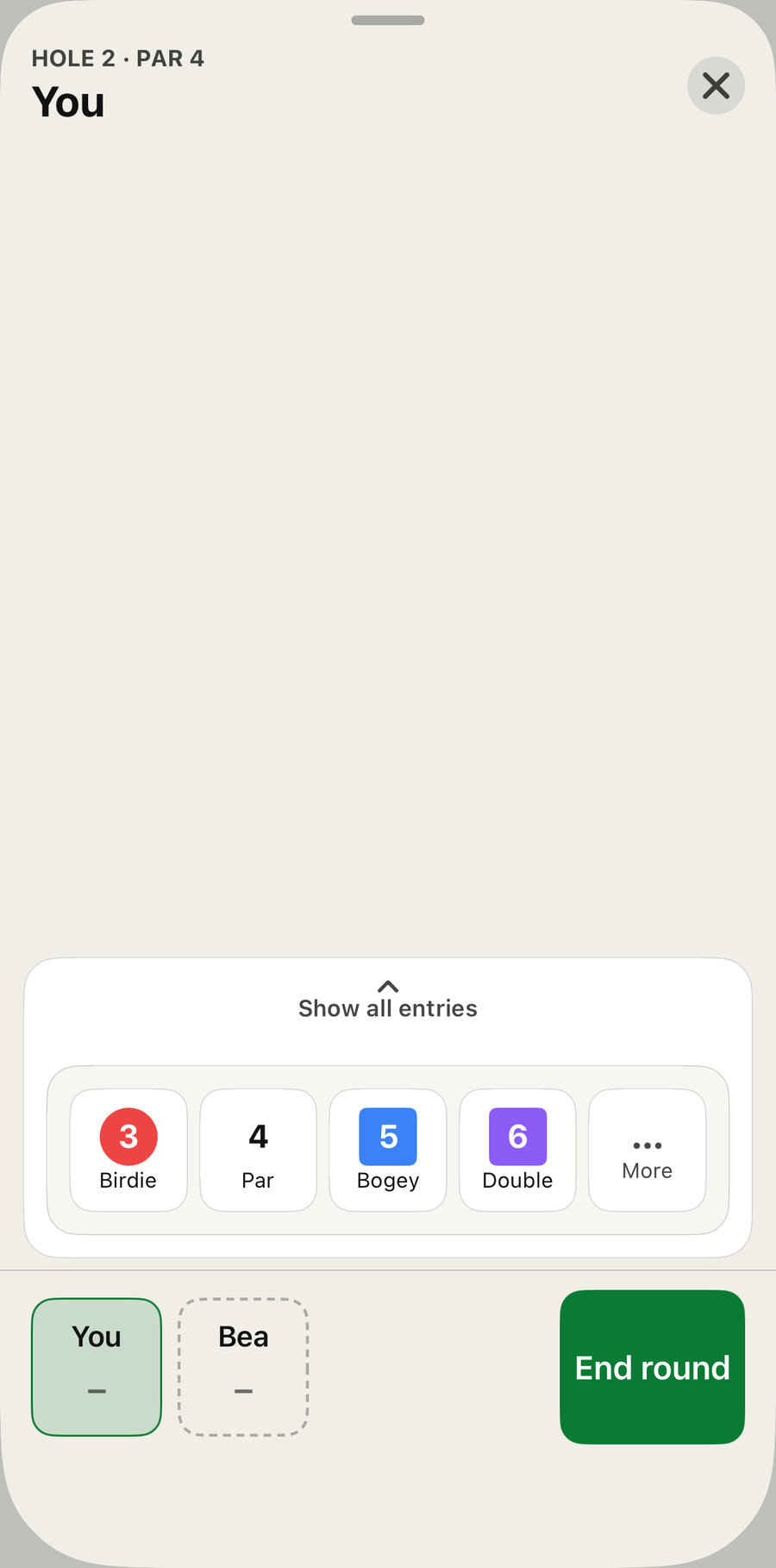
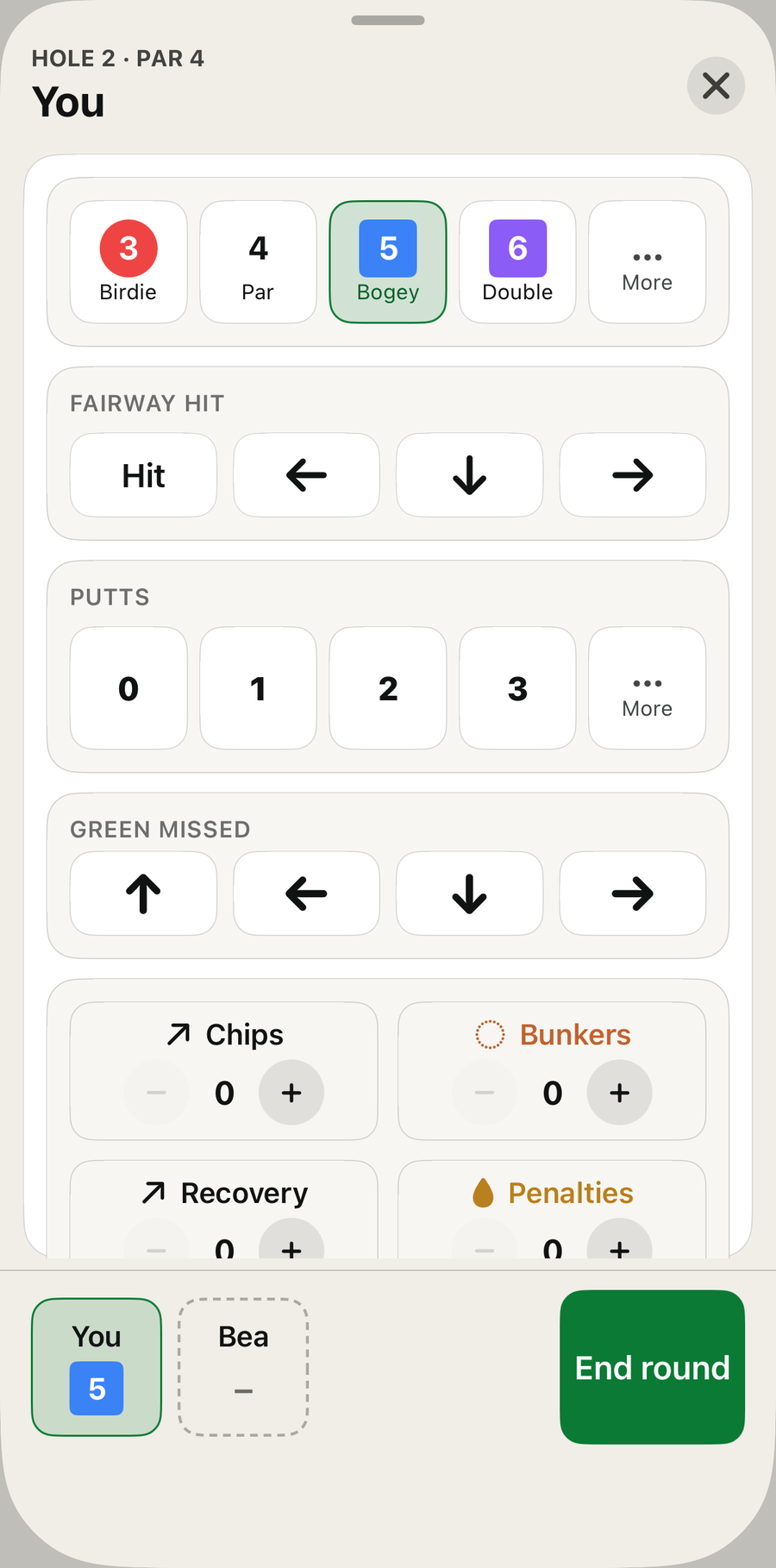
- The header names the hole and the player; the chips (Demo › Nana › Jarkko) show whose turn it is and let you jump between players.
- The line under it is the running result — 4 · E — with a GIR badge once you have entered putts and strokes and putts add up to a green in regulation.
- Score: tap a chip — Birdie, Par, Bogey, Double or More, which opens the other totals in the same box (every score up to 12, Picked up, and last an Other score field where you type any other number and tap Set; a number from 1 to 30 you typed and did not Set is saved when you leave that player or hole, as Set does). No chip is selected on a hole you have not scored — par included — and the Next hole button at the bottom works anyway: nothing after the score has to be answered. Each chip shows the number in the mark it will get on the card: a red circle for a birdie, plain for par, a blue square for a bogey, a purple square for a double.
- Fairway hit (par 4 and 5): ✓ for hit, or ← ↓ → for missed left / short / right.
- Putts: 0–3, then 1st putt distance (<1 m … 8+). No chip is picked until you pick one — enter only the score and the hole is saved with strokes alone, no putts and no GIR; the app never guesses them for you.
- Green missed: shown unless your strokes and putts say you hit the green — tap where it went (short / left / long / right) and the hole counts as a missed green even with no putts entered.
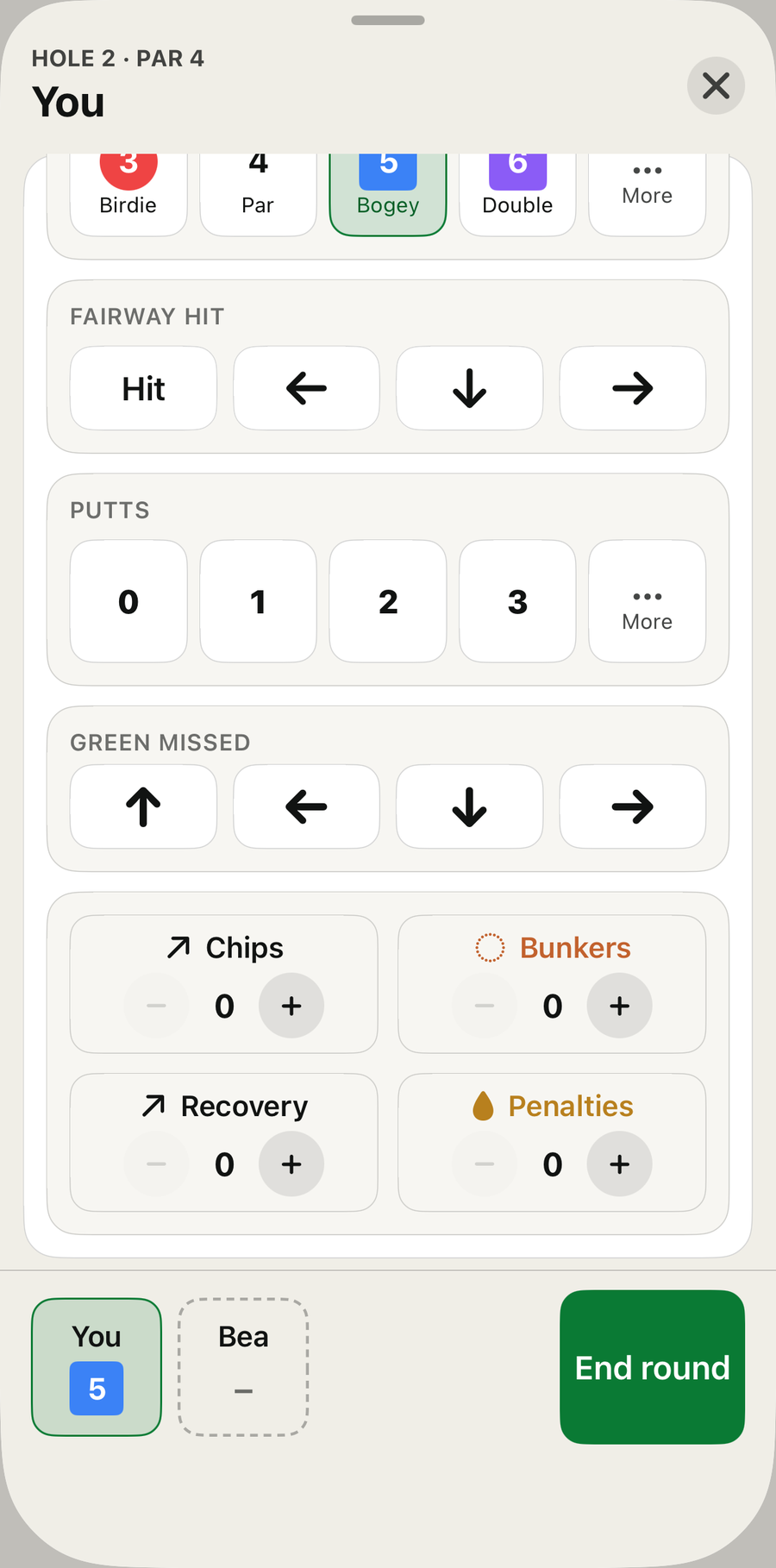
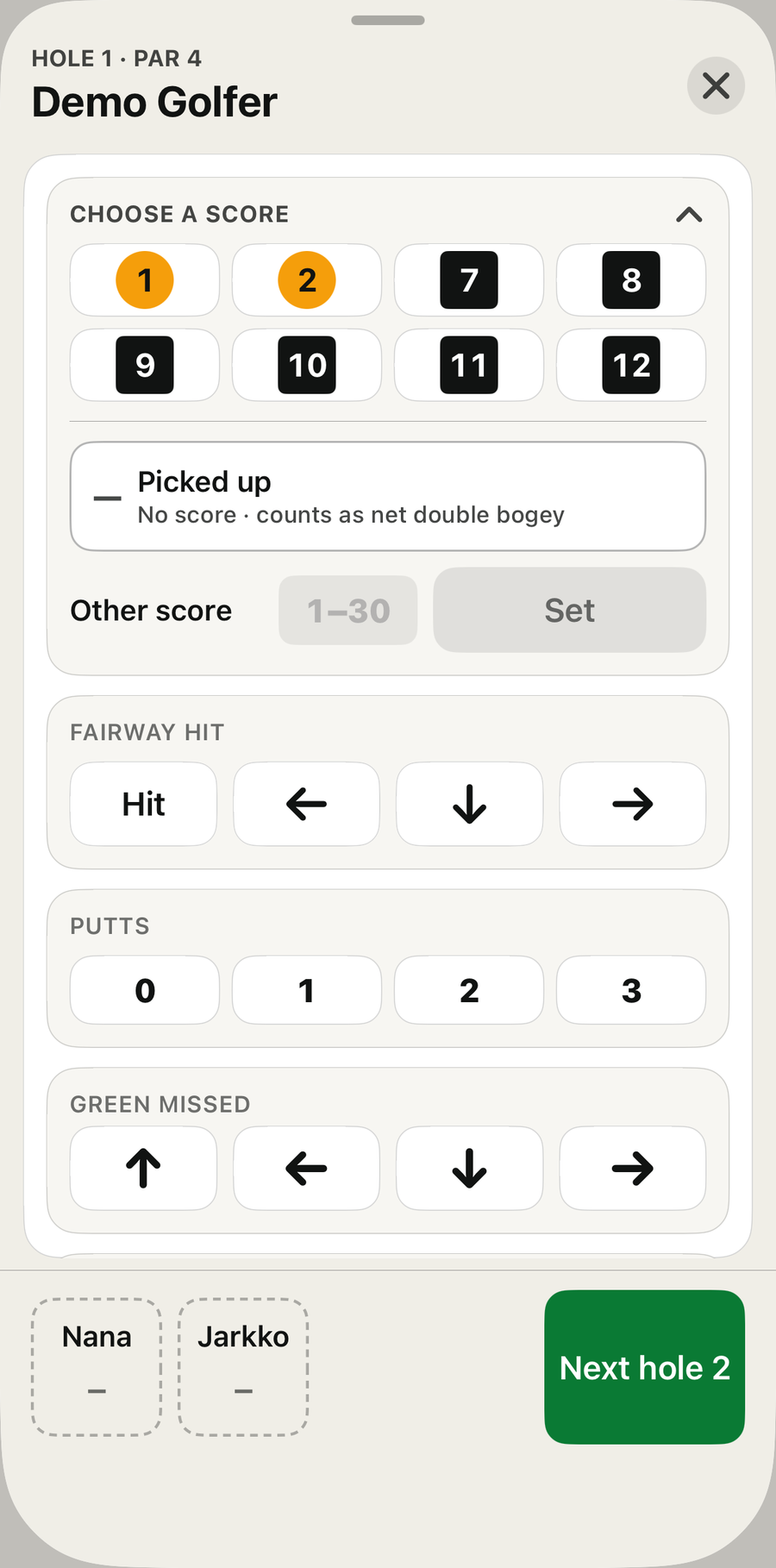
- Detail: steppers for Chips, Bunkers, Recovery and Penalties. They share the strokes left over after the tee shot and putts, so they can't add up to more than you took.
- Pick up: the — chip records no score for the hole; it counts as a net double bogey in the total.
3. Saving and moving on
The bottom bar is one row. Every player on the hole has a box in it: your own box (or your team's) first on the left, then the others, then the Next hole button at the right end. The order is the same whichever player you are scoring, with their name above their score in the card mark; the box of the player you are scoring is highlighted and stays where it is. Names are first names, with the family-name initial added when two players share a first name (Test S., Test G.). A dashed box with a dash means they have no score yet. Boxes fill in by themselves as flightmates enter scores on their own phones. Tap another box to score that player on the same hole (a tap on the highlighted box does nothing); nothing is saved for the player you leave. In a team format there is one box per team, and on your own there are no boxes. With more boxes than fit they scroll sideways and the button stays in view. On a match format one line above the row says who won the hole and where the match stands.
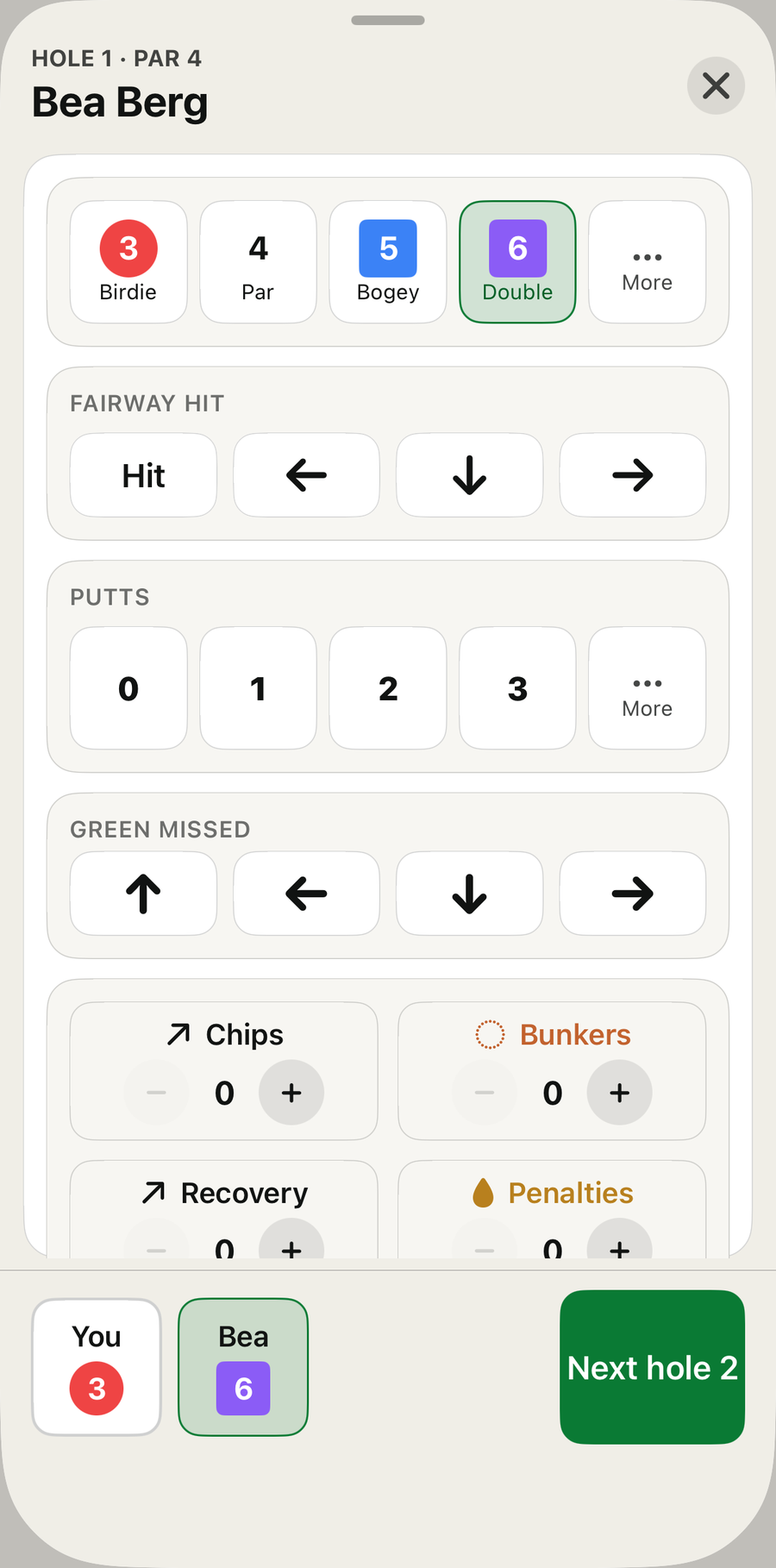
The green button at the end of the row is Next hole N — N is the next hole of your round, which is not always the number after this one (a nine-hole round or a shotgun start follows its own order). It is always available, even while boxes are still dashed: nothing is saved for a player nobody scored. It closes the sheet and moves the Play screen on (every score is already stored as you enter it). On the last hole of your round it reads End round and opens the finish review of your own card, whatever is still empty. When you opened the sheet by tapping a score in that review, it reads Back to review instead and returns you to the review. The hand-in question and the round summary's Done look at your own card and the guests you score; the finish review flags your own card's holes and holes nobody scored. The empty box of a flightmate who uses the app raises no warning: they enter their own scores on their own phone and hand in their own card, and their entries are merged into the flight's card.
Close the sheet with × to leave a score for later; tiles with no entry stay blank.
Anyone in your flight can correct a hole; the newest edit shows on every phone.
4. Team formats
In a one-ball team format (Scramble, Greensome, Alternate Shot (Foursomes), Pair Skins, Scramble Match Play) the tiles become Team 1, Team 2 … — one ball per team, so you enter one score per team. (In Best Ball and Shamble, each player still plays and scores their own ball while the card totals the team's best score(s).) A one-ball team's hole counts as played as soon as its strokes are in — the team ball has no putts of its own — so a team score entered on another phone shows on your Card and in your "thru" count straight away. In Alternate Shot (Foursomes), partners alternate shots with a single ball and the pair receives 50% of their combined playing handicap (unless overridden on the team).
A team's score sheet asks only for the team's strokes: the score chips and nothing else. To record more for the team ball, turn on Advanced scoring under the team's name; the sheet then also asks for the fairway, putts, first-putt distance and green miss, one at a time. The switch is remembered on your phone for the rest of the round (every team and hole), and is not shared with anyone. Turning it off hides those entries again without deleting what you already entered. A player's own ball (stroke play, Stableford, Best Ball) has no switch and its sheet is unchanged. The Card's score editor always shows the whole form.
5. The Card tab and finishing
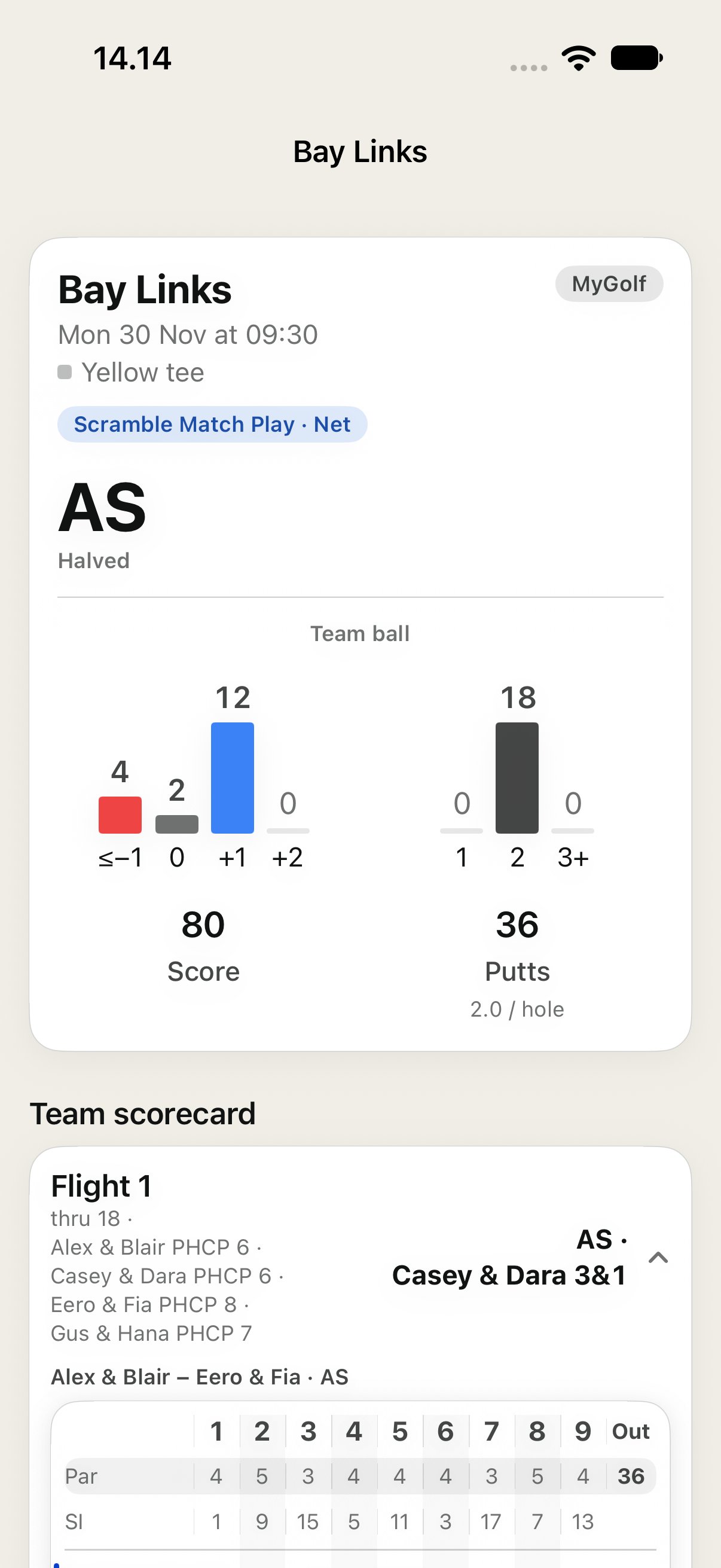
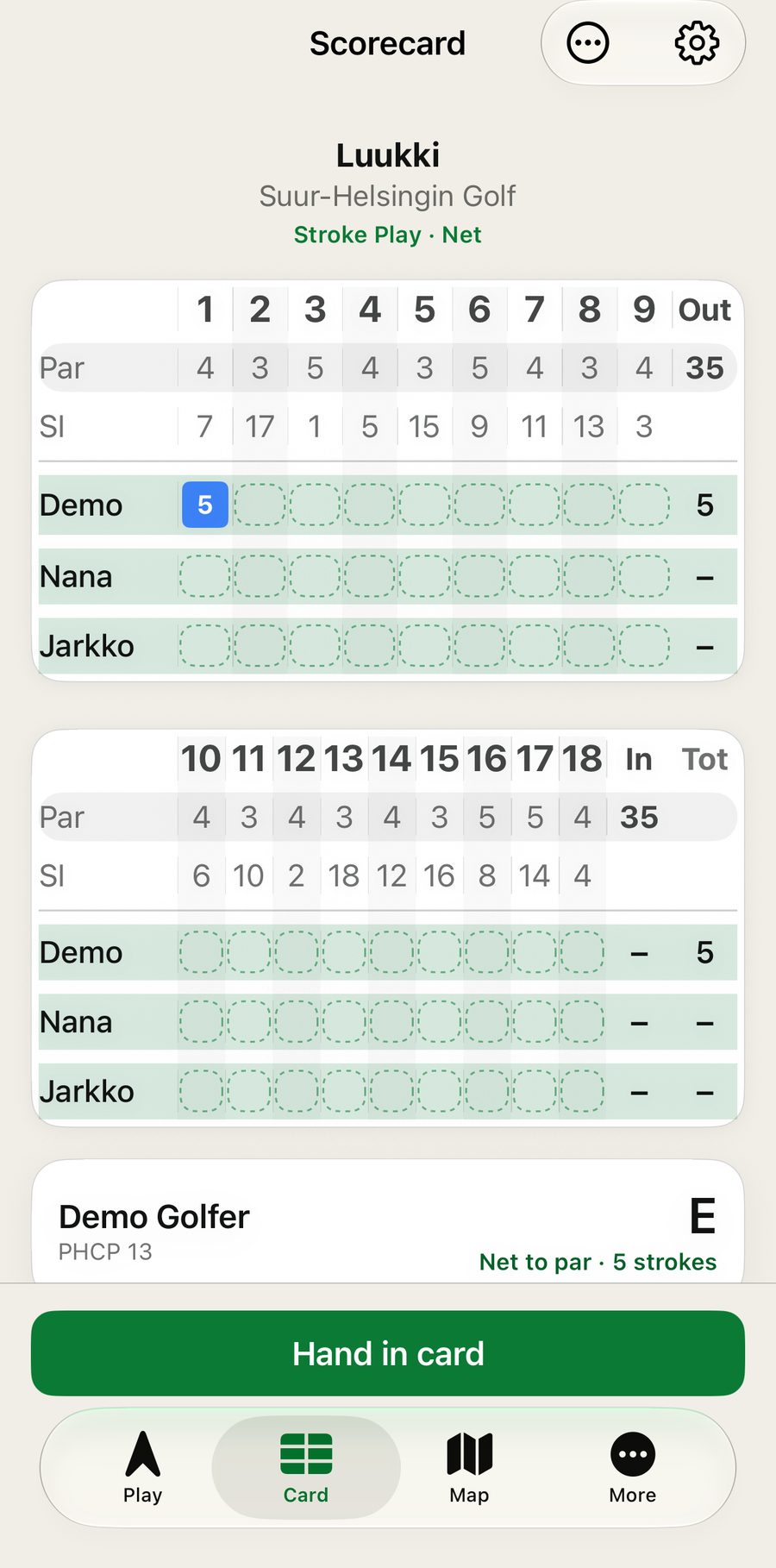
On the round's last hole, once everyone in your flight has a result, the Play tab shows a green Review & hand in card button under the header (Review & finish round when you play alone); it opens the same review and confirmation as the Card's button. Card shows the full scorecard for everyone in the round — par, stroke index, every hole, OUT / IN and totals — and a green Hand in card button at the bottom (Finish round when you play alone). Under the course name it says which game you are playing and whether handicaps count — "The Marty · Net", "Skins · Gross" — exactly as the round was set up. A team keeps the same colour on the Card and on the finished round's detail; it does not change as the standings do. A nine you have not started shows "–" as its total, never 0: if you finish early after hole 14, the round's score is the 14 holes you played — the unplayed ones are not zeros and do not count for anything. The scorecard comes first, with your own row at the top; each player's result card follows it. The nines are in the order you play them: if you started on hole 10, the IN nine is shown above OUT. Each player's name is shown short — the first name, plus the initial of the family name only when two players share a first name. Under each player's scores is the game's own row: Points in a Stableford game, Net and then Points in a Marty (the net each hole was decided on, then the 5/3/1), Skins in a skins game (the skins that player won on each hole, a carried skin included in the number — there is no separate skins or standings line beneath the players), and in stroke play, gross or net, Net, their net score to par on each hole. During play that stroke-play Net row stays under each player's strokes — their net score to par on each hole (−1, E, +1, under par in red), with the nine's and the round's sum under OUT / IN / Tot; a hole with no score or a pick-up stays blank. There is no separate Allowance row for a player: the strokes a player receives are marked by the small dots on the score cells. The stroke dots are the ones the server counted for the round (so a best-ball trip round played at 85% shows the 85% strokes); with no connection and no results loaded yet, the card shows no stroke dots and no Net row until the results arrive. A game set to play gross gives nobody strokes, with or without a connection: skins with Net skins off (the default) and best ball with Net scoring off. Gross stroke play still shows the strokes, because its card reads your net beside the gross. Match play, and skins played with handicap, add a Net row under each player — the net score to par each hole was decided on, so equal strokes with different nets show why one side won the hole — and match play's Standings row shows the match. When a round has several matches, each flight's card shows its own match: the player who won a hole has their score in a disc in their team's colour, the Standings cells are in the colour of the side that is ahead ("AS" is neutral) and end with the result, for example "2&1", in the winner's colour. If the server has not said which hole belongs to which match, the card says that the standings per flight are not available instead of showing a mix. The same holds in the Card tab during and after the round. A flight that holds two matches (four or more sides in one flight) shows each match as its own small card under the flight, headed by its two sides and its result, with its own hole winners and Standings row. A match is decided by what the server says — it closed early (the holes left are struck through), every hole of the card was played (nine for a nine-hole match), or it was halved — never by the card guessing. On a round with several matches the result at the top ("Won 2&1") is your own match's, and the results panel under the scorecard shows one strip per match, headed by the two sides; if the server has not said which hole belongs to which match, the panel says the standings per flight are not available instead of showing a mix. In a team match the strip no longer shows a stray ½ cell for each team's own score rows. In a Marty, each player has a Points row with that hole's points, and each squad's section has the squad's own line with its points per hole. These are the game's own points and stay on the card; if the trip's organiser has hidden the event's personal points, you do not see those (the Round points list on the round's points card and the standings), nor does anyone but the organisers. In that list, and on the round's Score line, the to-par figure reads like the card's: E at level par, +n over par, -n under par (red). A player's Net total is their Net row's sum, under Tot — the card has no separate Net column. Each flight or team row of a multi-flight card reads "thru 7" followed by its players' playing handicaps ("Alex 8 · Blair 14"; a player without a handicap index is left out), or the team's for a scramble ball; a scramble's ball row carries no "Team ball" label, the team heading above it says whose ball it is. During play a scramble or greensome ball shows only its strokes and the game's rows; its putts, fairways, greens, bunkers and penalties appear on the finished round's card. The rows that decide the game — Skins and Points — are drawn as large as the strokes above them (match play's Standings row uses one smaller size for every hole, so "3UP" fits its column); Net and your stat rows stay smaller. On the narrowest phones the score circles and squares of the back nine shrink a little to fit their columns, so neighbouring marks never touch; on wider phones they keep their usual size. Each player's name row sits on a soft green band so every player's block starts clearly, a thin line in the text colour under the last row of each player's block (the score row and its Net, Points and stat rows) shows where it ends — none after the last player of a nine — the rows under it alternate a faint grey shade and none, and every even-numbered hole's column is more lightly shaded so a hole is easy to follow down the card. A one-ball team's Net row reads to par too ("-1", "E", "+1"). In every game except match play a Net row reads to par — "-1" (red) under par, "E" level, "+1" over — and its OUT / IN / Tot are the sums of those figures; only match play shows net scores ("3", "4") on its Net rows. When the skins game has a stake, each Skins label also shows that player's running amount ("Skins +€8"), green when up and red when down. The amount counts only skins already won. While a tie is carrying, a line under the card says what rides on the next hole ("2 skins riding on hole 7 · €8"). A tie on the round's last hole has no next hole, so no such line shows; those skins are void, and the finished round's Settle up lists them as unclaimed. During play the card is drawn in larger type than the finished card and shows only scores — no putts, fairways, greens, penalties or bunkers rows. On the finished round's stroke-play card your own row also shows your Putts, Fairways, Greens, Penalties and Bunkers hole by hole, as far as you entered them.
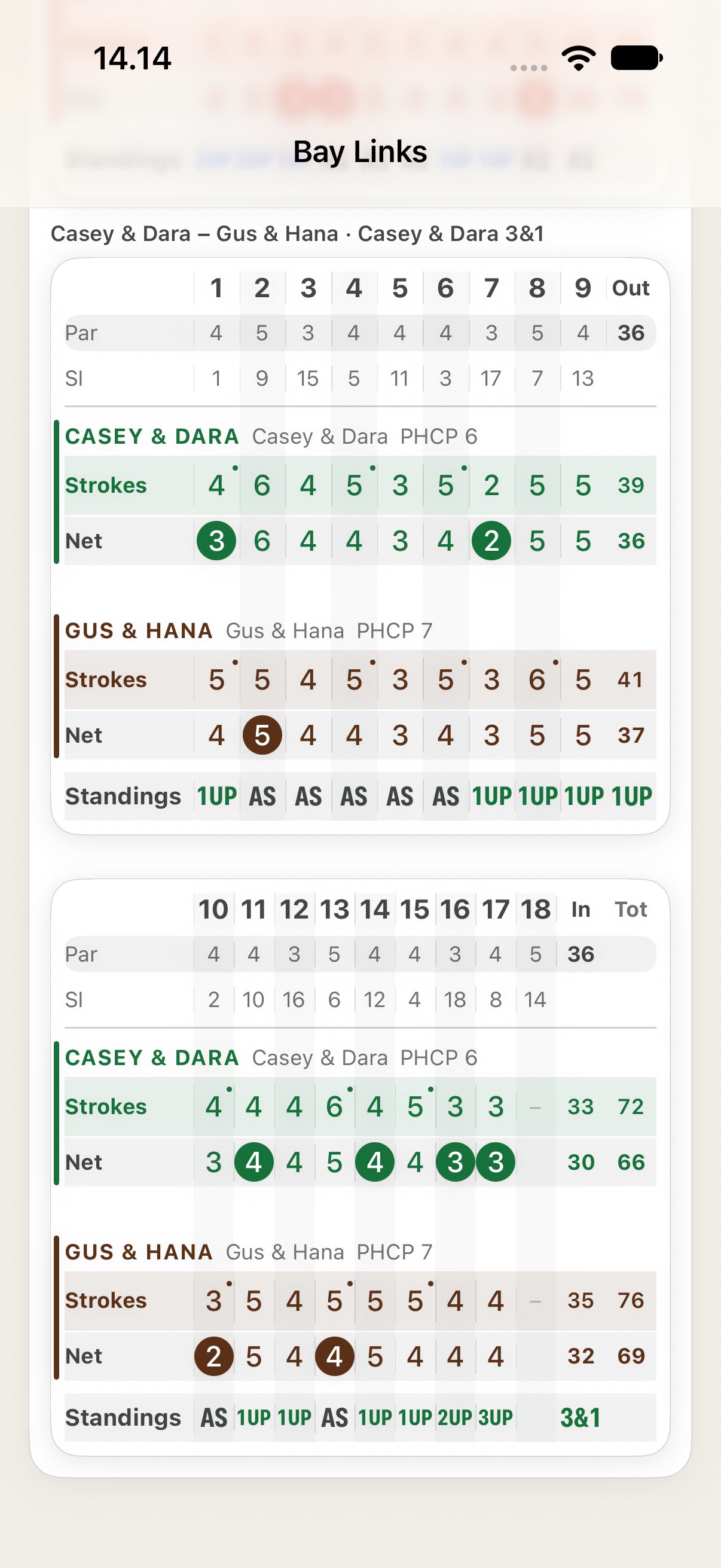
A small check mark by a player's name on the card means that player has finished their round; a player still playing has none. During the round the card's text is larger, so the mark usually sits under the name instead of after it.
In a round with several flights, or with teams, the card folds into rows you tap open. Flights come first: your own flight is open, every other flight is folded to one line — its name, how many holes it has played ("thru 7") and its score so far (points, net to par or the match status, whichever the game is decided by). Below them, a team game adds a Teams section (Squads when the teams are a trip's squads) with one folded row per team in live standings order; tap a team to see its full card — team ball or team line, Net and Points. When each flight is one whole team (a scramble played as a flight), the flight rows are the teams, in standings order, and are not listed twice. A squad's team is named from the squad and the flight the organiser set: "Harem · Flight 2" in a list that mixes flights, just "Harem" inside that flight's own row, and just "Flight 2" on the squad's own card; where the squad or flight is not known the team keeps the name it was given. When a team's row lists the handicaps of several teams, each handicap follows its team name after a colon ("Flight 1: 5 · Flight 2: 5"; in Finnish "Lähtöryhmä 1: 5 · Lähtöryhmä 2: 5"). A one-ball team (scramble, greensome) shows its team handicap in the header ("PHCP 12") and an Allowance row (labelled Allowance in the first column) above the team ball, in grey ("-1", "-2" per hole, and "–" on a hole or a nine where the team receives no stroke), so the allowance plus the ball is the team's net on each hole; when the round has no team handicap from the server, the phone works it out from the members' course handicaps with the same weights as the server (a member with no handicap counts as scratch), and only when that is impossible (nobody has a handicap) is the team ball shown gross with neither. In the Marty the flights show each player's own points, and the squads follow as the Teams rows; open a squad and its heading carries its points ("Squad Red · 62 pts") and its Team row adds up the members' points hole by hole. In a trip or league round where players belong to a series team, the section (headed Squads) shows the series teams instead; a squad's folded row is its colour, name and "thru N"; a squad that is one team in one flight (a scramble flight per squad) also shows that team's own score on the right, the same figure as its flight row ("-9", red under par), and once the organiser's points for the round are published the line under the name leads with the squad's points: "6 points so far · thru 12" while the round is still being scored, "6 points · thru 18" when they are final (the other scores are on its opened card) — and each gathers its balls (for example both pairs of a four) with their combined result for this round only — the running total across rounds lives in the trip or league itself. When every flight is a whole team, the flight rows already are the teams and are not repeated there. If that round has no flights, the series teams are the card itself: your own series team comes first and open, with its pairs grouped under it. Sides and squads have their own colours — red, blue and green first — chosen to read clearly on their tinted rows in light and dark mode and for colour-blind players; a side is always also named or lettered. A singles match (one player against one) has no Teams section — the match state is on the card's header; a pairs match lists its two sides as teams. On a trip round opened with View scorecard, a flight's row also lists the squad points the organisers awarded it ("4 points", or "Kebab: 4 points" when the flight lists several squads, with their short breakdown after it); those are squad points, so they show even while the event's personal points are hidden. The card is the same one the finished round shows under Rounds, and tapping one of your own scores still opens it for editing. In a one-ball team format (scramble, greensome) a fix to the team ball there is saved for every teammate, the same as entering it on the Play tab — also on a shot-tracked hole of a team that is not one-ball. A one-ball team never shot-tracks: its ball is always entered as a score.
In a match, the result reads from each side: the side that lost shows 1DN or Lost 2&1 (never blank), and the match headline on a finished round shows your own side's result the same way — 1DN under Lost. When the competition awarded points, they sit next to the result — Kebab 5&4 · 10 points on the flight row, Lost 5&4 · 0 points on the Teams row, 1DN with 0 points beside it in the headline; a side the competition gave no points shows none. A flight's team handicaps are labelled (Baklava PHCP 7 · Harem PHCP 5), so they are not read as points. In a match, a team ball's Net row shows the net score (the ball's strokes less the strokes the team receives on the hole, "3"), the team that won a hole has its net figure filled in the team colour, and the small Allowance row above shows the strokes received as a plain count. Teams are blue, red and green, in that order, before any other colour is used.
The points, standings and team lines come from the server, and the card says when it could not get them rather than quietly dropping them. If the game has no results to show (the round's game is not one the app scores), a line under the card reads Results aren't available for this round. and the card shows strokes and to-par only. If the phone loses its connection, the last results stay on the card with Results as of 14:05 under it — the time they were fetched — until the next refresh succeeds. Any other failure shows Team scoring couldn't be loaded. with Retry, and the last results, if there were any, stay on the card under their Results as of time.
On another phone. When the round is opened on a phone that did not start it (you carry on with it on a second phone, or a flightmate joins), that phone plays the same game: the side game and the format's options (a scramble's handicap percentage, a net allowance) come with the round, so its Card shows the side game and the same nets and points.
A tee with no rating. A player whose tee has no course rating and slope gets no handicap strokes, as on the server; the app does not make a rating up for that tee.
Handing in always opens a review of your flight's card first — whether prompted automatically after the last hole, from Play's Review & hand in card button, or from Card's Hand in card button — even when every hole has a score. Any holes missing a score are listed there too (only the holes you are playing: a nine on an 18-hole course is never asked about the other nine), and tapping a missing hole takes you back to that hole to fix it. To change a score, tap it on the card ("Tap a score to change it."): the review closes and the score sheet opens on that hole for that player, just as tapping their box on Play does. You can change the scores this phone enters for your own flight this way (not a flightmate who tracks their own shots on their own phone), but never another flight's scores. The change is saved like any other score, with or without a connection; the sheet's button then reads Back to review (instead of Next hole N) and takes you straight back to the review with the updated card, without moving the round on; swiping the sheet down does the same, and the boxes at the bottom still switch to another player on that hole. Nothing is handed in until you tap Hand in card in the review and confirm.
Tapping Hand in card inside the review (Finish round when playing alone) then asks to confirm — Hand in your flight's card? (Finish round? solo) with Hand in card or Not yet (and Enter missing scores first when holes have no score) — and only confirming there hands in the card for your whole flight at once, as it stands: everyone you are playing with, guests included, and never another flight's; flightmates who also enter their own scores and hand in their own cards are merged into it as a union. It works without a connection; the phone sends it when it can. Start again, Leave round and Discard round are no longer in this question: they are in the round's ••• menu at the top of the Card, and each asks before it does anything. On a group round, Leave round only removes the round from this phone; your scores stay with the group. (Capture owed: the flight-card review and hand-in confirmation.)
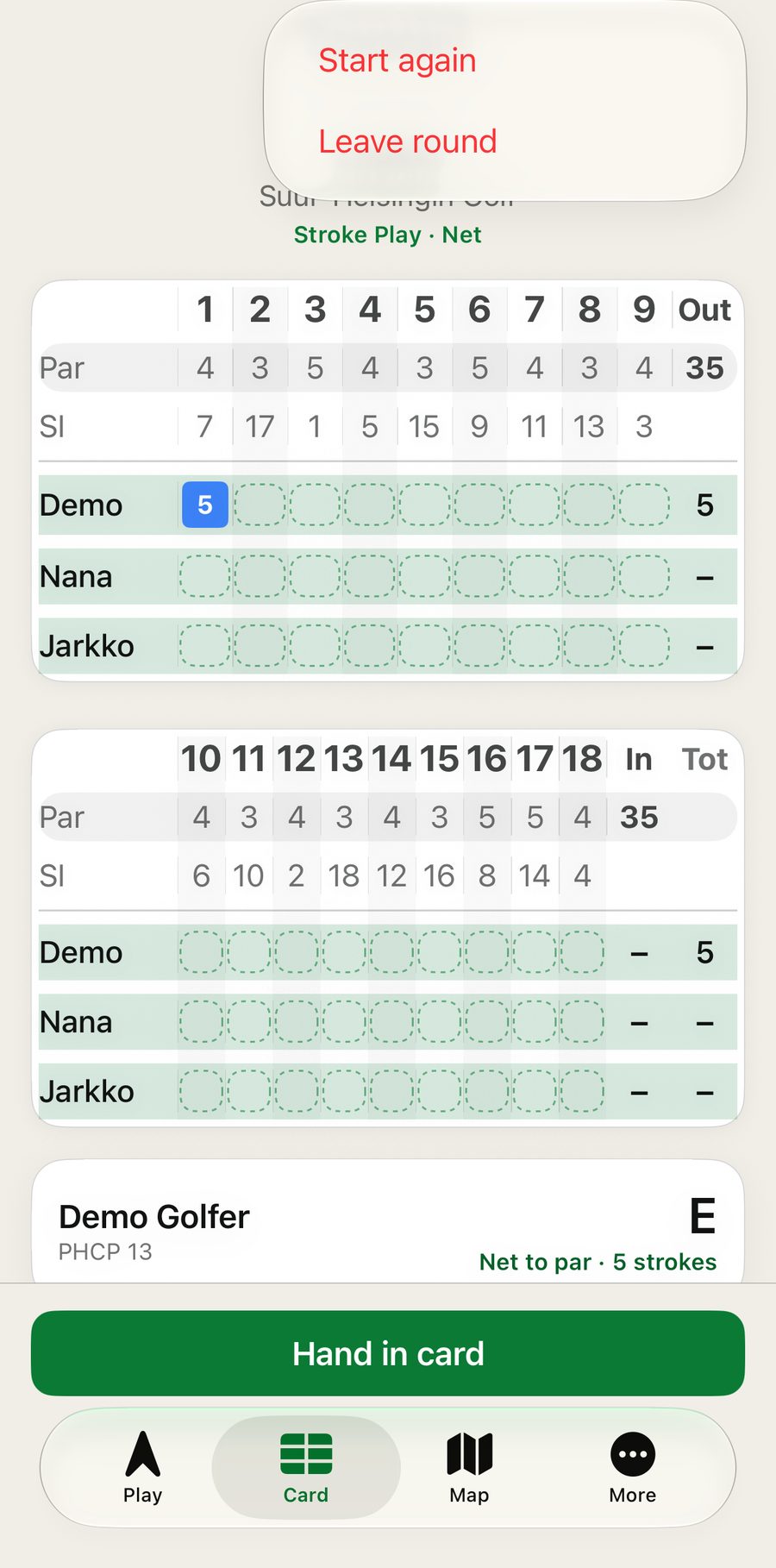
After you hand in, the card stays open and you can still fix a score. On a round run by an organiser (an OurGolf competition or group round) the Card says Handed in · you can fix scores until the round closes while other flights are still playing, then Handed in · you can still fix scores until 15:30 once every flight is in: the round closes one hour after the last card, or earlier if the game master closes it. After that the card is read-only and says Closed by the organiser (or Closed at 15:30). Handed in by mistake? Undo hand-in in the ••• menu opens your flight's card again, until the round closes. On a round you set up yourselves the round finishes when the last card is in, and you can edit it afterwards from Rounds. (Capture owed: the handed-in and closed lines.)
When the round has finished — the last flight has handed in — the card comes back titled Round complete — that is the confirmation, and a paired Watch stops tracking at the same moment. Done (top right) saves any last corrections and leaves the round; after an early finish it asks once (Close anyway) because the unplayed holes are empty. The finished card's Stats shows Chips and Penalties and then the round's detail block of four (Putts and the birdie / par / bogey spread appear once, there): Score (your strokes, with small bars for how many holes were birdie or better, par, bogey and double or worse), Putts (the total and per hole, with bars for one putt or fewer — a chip-in counts here — two, and three or more), and Greens and Fairways as X's — hits in the middle, misses in the V on the side you missed (short at the bottom, long at the top). In a scramble or greensome they are your team's ball, marked Team ball.
6. Changing the round mid-way
The ⚙︎ in the Card tab's title bar opens Edit round (on a group round it shows the group's setup read-only and lets you change only how you track; it is not offered once the round is locked); so does the Edit round action on Home's Continue a round card for your round, which brings you back into the round first. Both open Edit round — the same form as Round Setup, with the course locked and no starting-hole row (a round in progress has used it). Nothing you change applies until Save; Cancel leaves the round as it was:
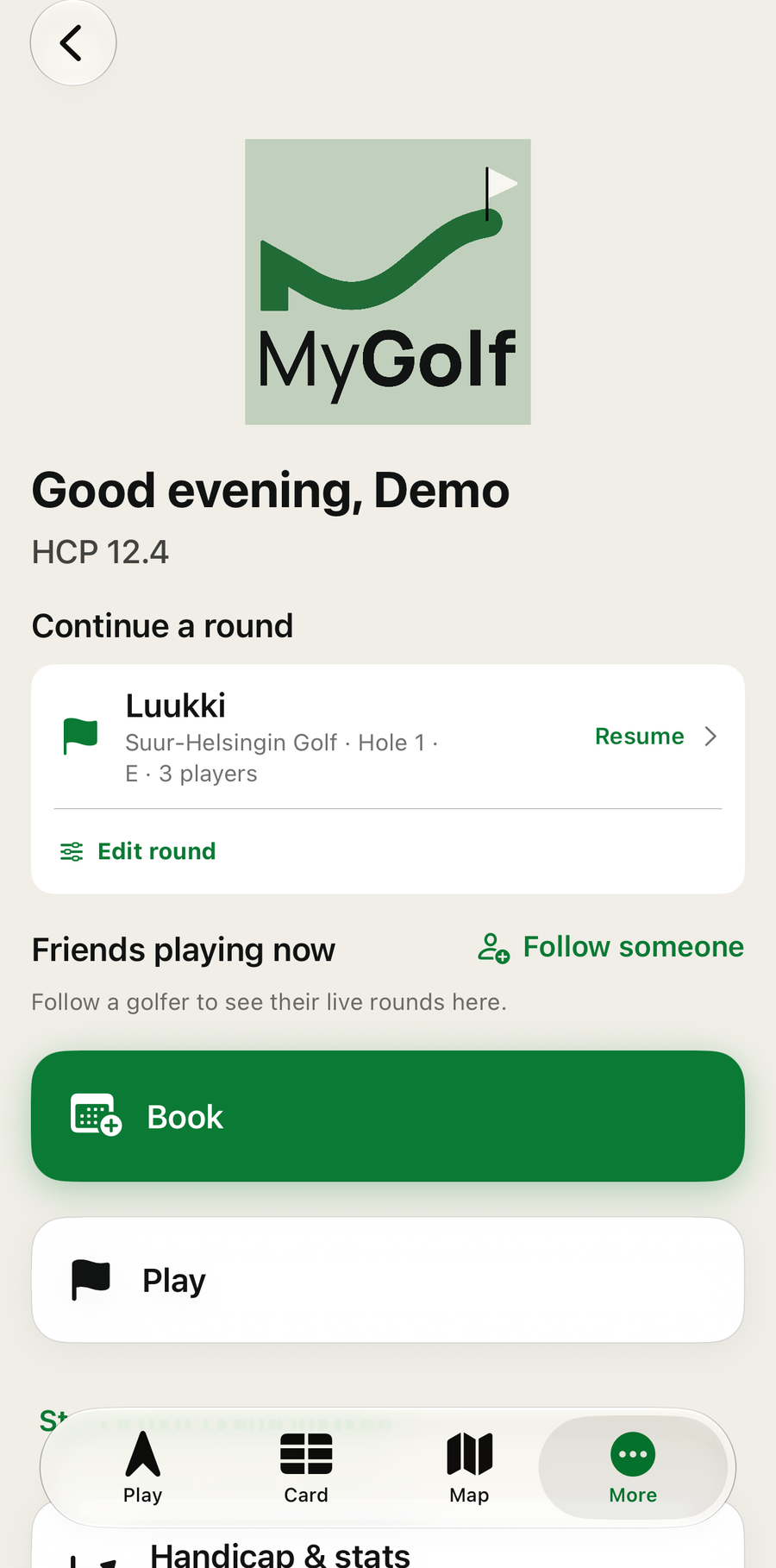
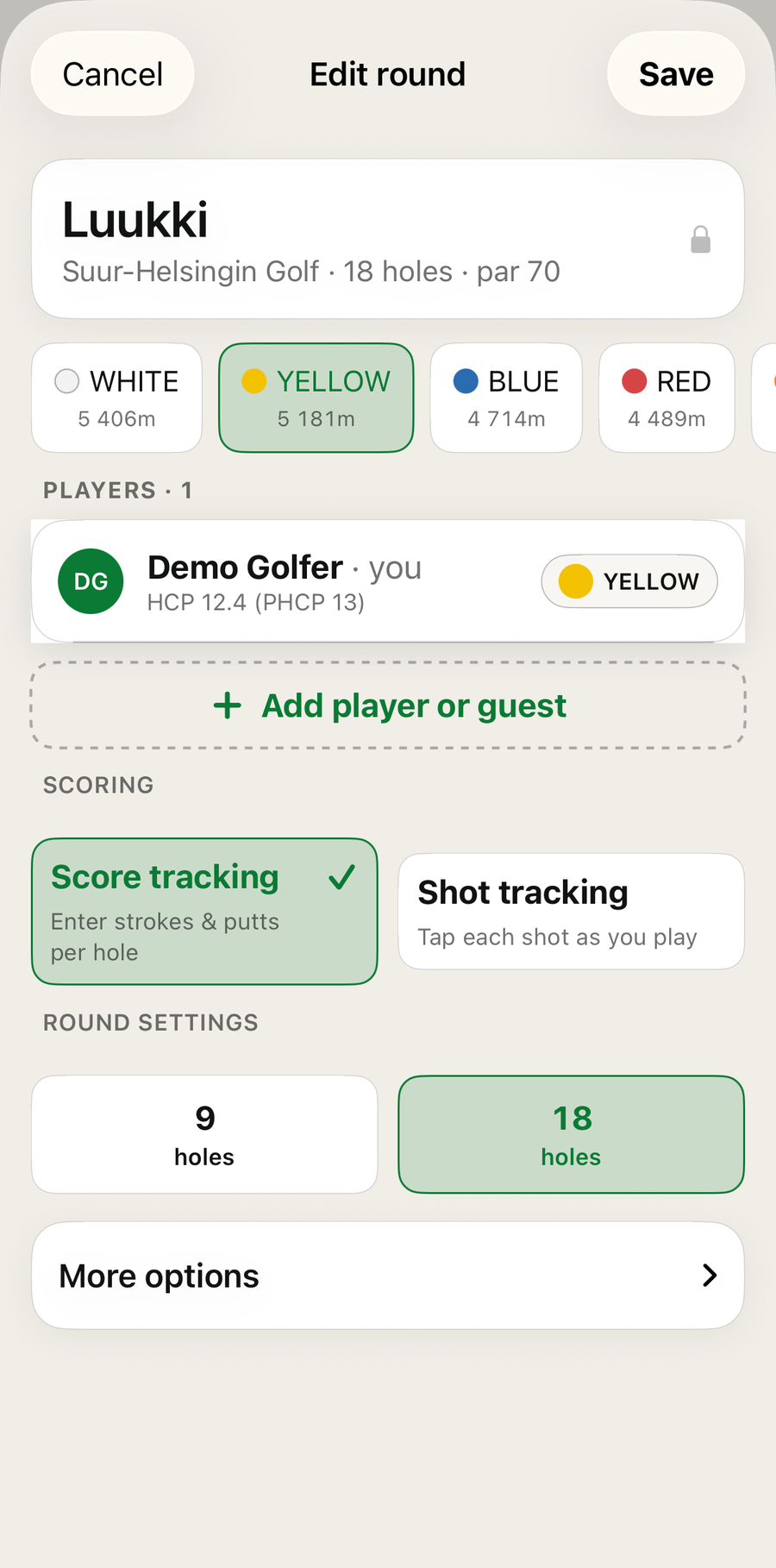 Tees, players, scoring mode and More options can change mid-round; the course cannot.
- Tees — for the group, or per player on their row.
- Players — Add player or guest for someone who joined late; swipe a row left to remove someone, or to Skip them (they stay on the card, this phone just stops asking for their score) and Unskip later (Skip and Unskip also wait for Save). If they already have scores you are asked to Keep their scores (their holes stay on the card) or Discard their scores (their scores and shots are deleted, including any not yet sent). Someone who joins the round while the sheet is open stays on the card when you Save.
Swipes on this screen
| Row | Swipe left | Swipe right |
|---|---|---|
| A player (Edit round › Players) | Delete · Skip / Unskip | — |
- Scoring — switch between Score tracking and Shot tracking.
- 9 / 18 holes and Competition mode — both can change mid-round and are remembered if you close the app. Turning Competition mode on switches plays-as off, so distances show as conforming distances only.
- More options — the format's options (for example skins rules or the handicap allowance), the side game and a team's handicap override, as in Round Setup. The primary format and the teams (who is on which team, their names and how many) are locked once the round has started. The sheet says so under the format chips, and the Teams sheet shows only the handicap overrides.
Save applies the change to everyone in the round; a change to the format's options or the side game re-scores the holes already played.
7. Group rounds
A round your group sets up (a trip round or a round on the OurGolf site) is a group round. Scoring it works as in the rest of this guide, with these differences. (The pictures below were taken with invented players: the layout is the app's, the data is not.)
- Your group sets the game. The format, the side game, the players, the tees and the handicaps come from the group. Edit round shows them read-only under This round is set up by your group., and where you would add a player it says Add players through your group. The 9 or 18 holes choice and Competition mode are read-only too: on a group round Edit round changes only how you track and, by swiping a flightmate's row, Skip or Unskip (whether this phone asks you for their scores). There is no way to remove a player or delete the round from your phone.
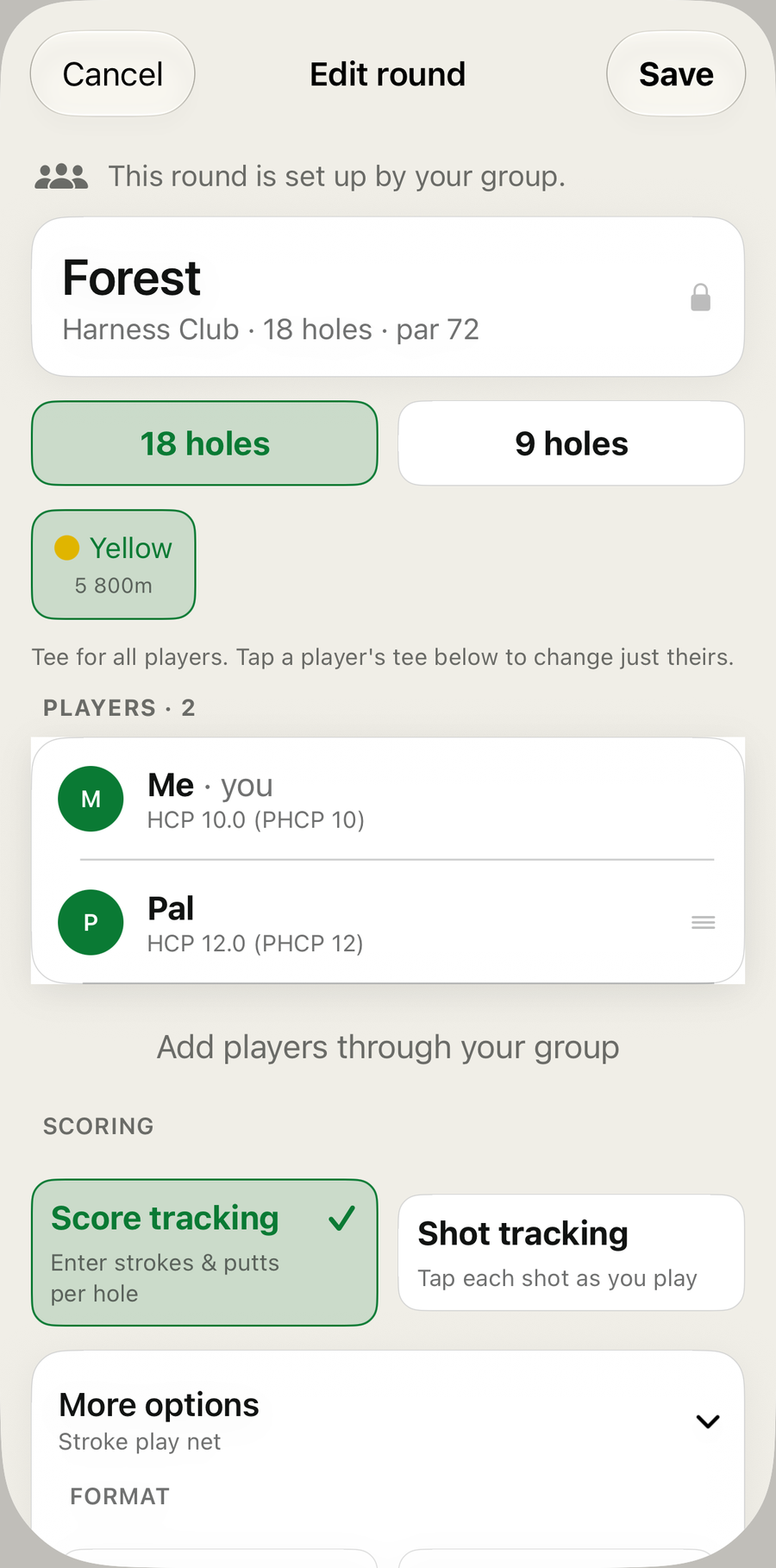
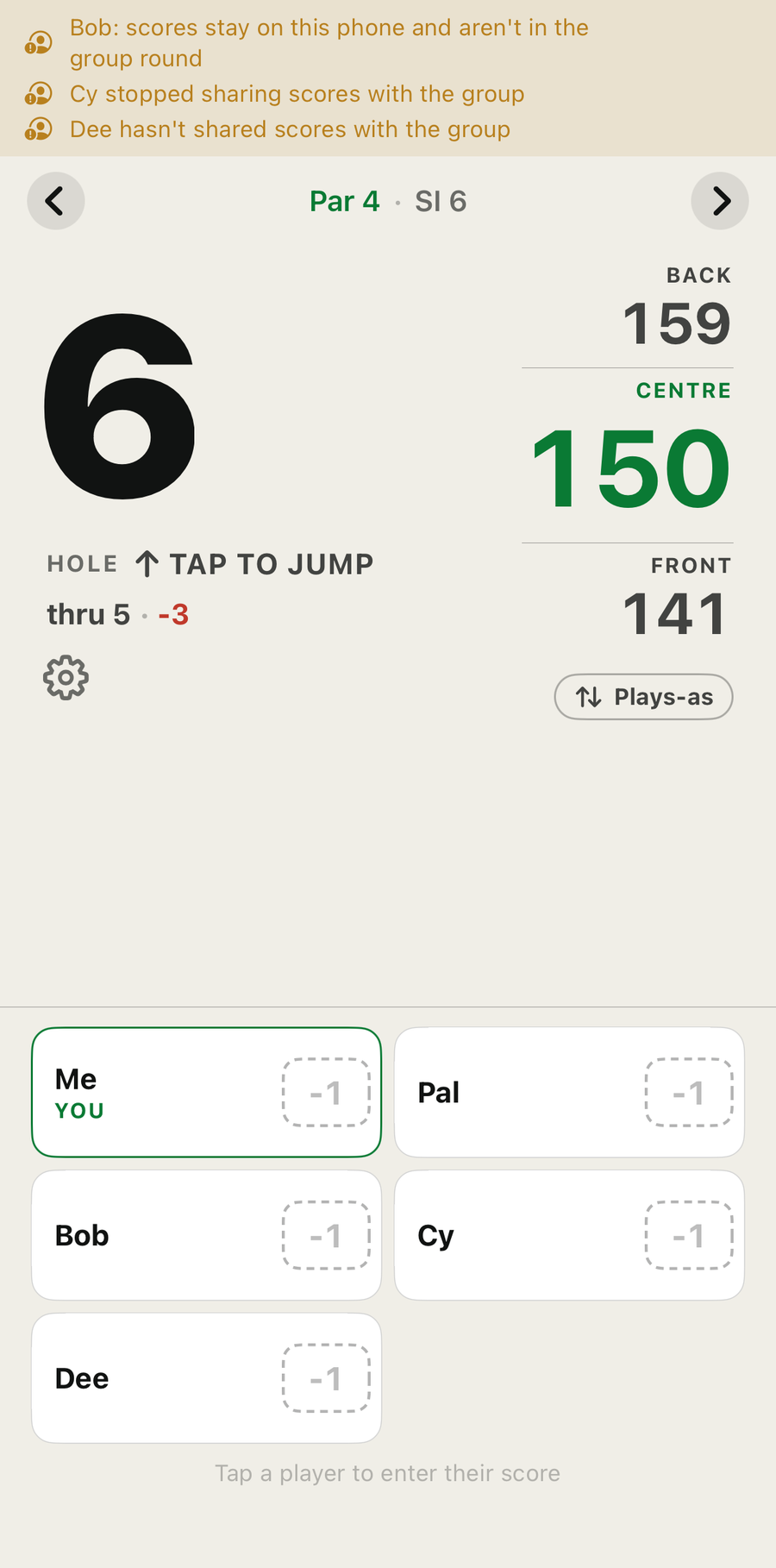
Whatever the group changes reaches your card the next time it refreshes, and nets and points recompute; no score you entered is ever removed. - How you track is still yours. Score tracking or Shot tracking is your own choice, and Edit round still lets you change it; the change is saved to your seat in the group round. Open Edit round from the Card's ⚙︎, Home's Continue a round card or Round settings in the hole grid; MyGolf no longer opens it by itself after you join. In a one-ball format (scramble, greensome) a golfer's shots can't be the team's ball, so the round always runs in Score tracking, the Shot tracking card stays off, and a competition in such a format starts in Score tracking. - Resuming a round that is not a group round: you get the tracking mode saved to your own seat if there is one. A round you created keeps the mode you chose; a round pushed to you (a round with flight numbers counts as pushed), or created by someone else, opens in the mode you last used on this phone (Score tracking if none). - A player who isn't in the group round. If someone you entered, for example a booked guest, is not a player in the group's round, they keep their own row on the Play tab, the Card and the round summary with one line saying why, and where their scores went: Bob: scores stay on this phone and aren't in the group round. Their scores and shots stay on this phone and in your own card and summary; they are never sent to the group and never deleted. A refresh from the group never replaces them. The group's own players appear next to that row. A player who stopped sharing scores with the group (Bob stopped sharing scores with the group) or has not shared them (Bob hasn't shared scores with the group) is shown the same way.
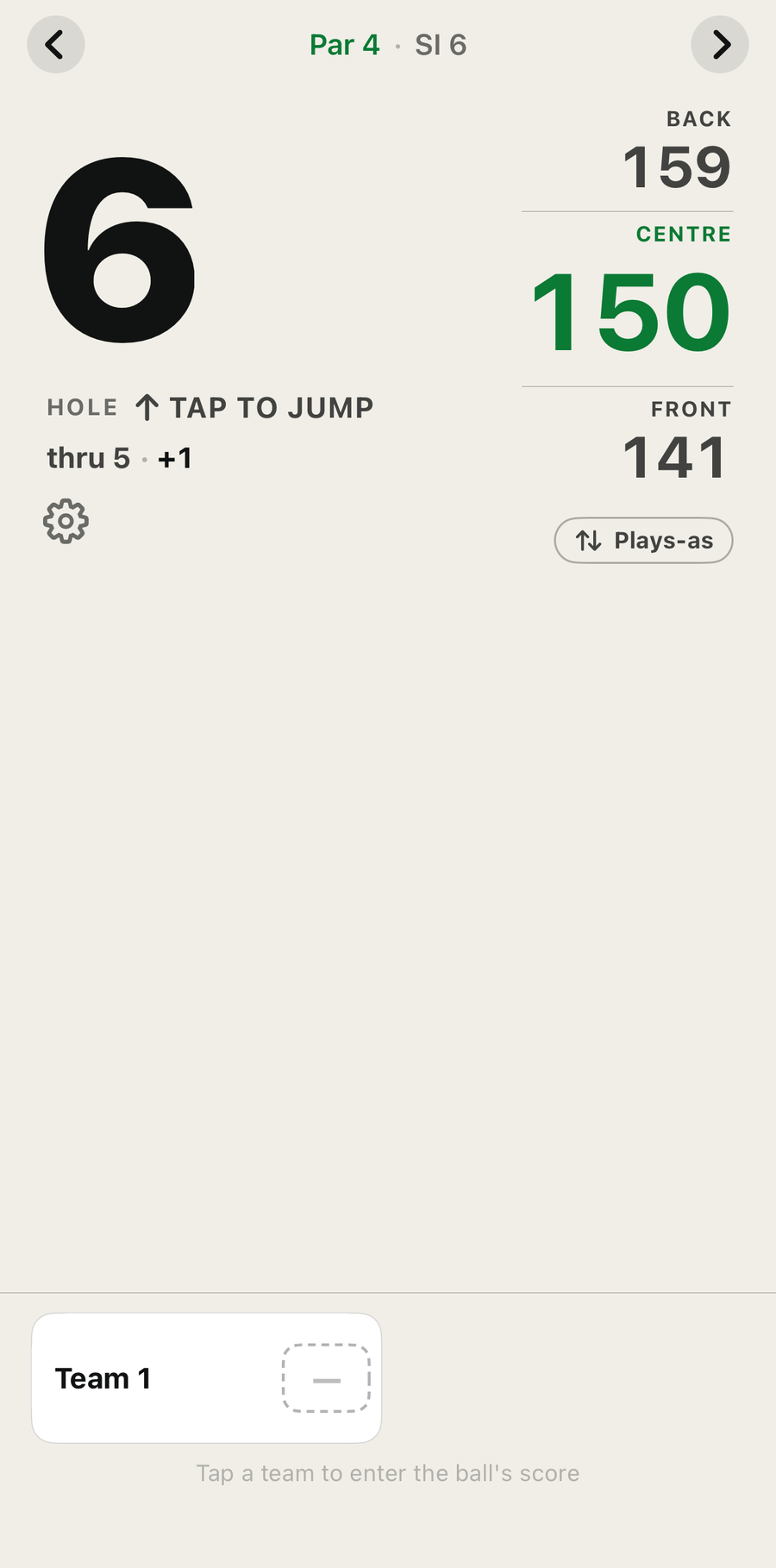
- A team handicap your group fixed. In a one-ball team format (scramble, greensome) your group can fix one handicap for your team. The thru 6 · +3 line on the Play tab and your Watch's score to par then show the team's net to par, worked out from that handicap, whether you or your partner entered the ball (a team with no handicap at all shows the team ball's score to par, never your own net). The same team figure is your net on the Card, Home's open-round card and the Live Activity (with the team's strokes beside it). A picked-up hole counts as net double bogey on your phone, which the group's result may leave out. The members' own handicaps do not enter the team ball. If the group changes the number, the figures recompute the next time the round refreshes and no score is touched. In a team format where each player plays their own ball (Best Ball, Irish Rumble, Marty), the Play tab line is prefixed with You (You · thru 7 · -4): it is your own net, not the team figure the Card shows. A team handicap you set yourself in a private round's options is used the same way. Other formats are unchanged.
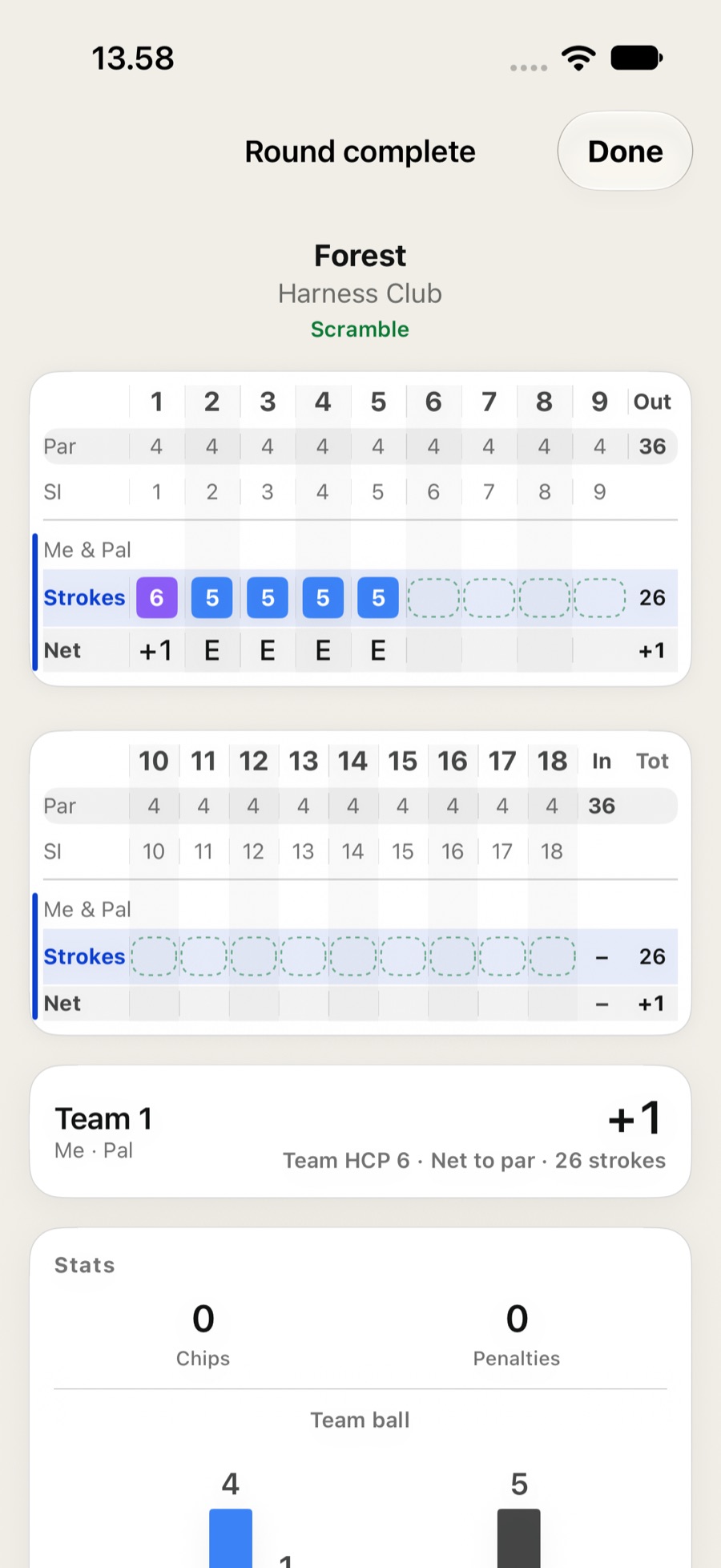
On the round summary the team's card leads with the team's net to par as the group's result has it (+1), with Team HCP 6 · Net to par · 26 strokes beneath, so the net you saw during play stays on the final view. Until the phone has the group's result (for example with no connection) the card shows the team ball's strokes and gross to par.
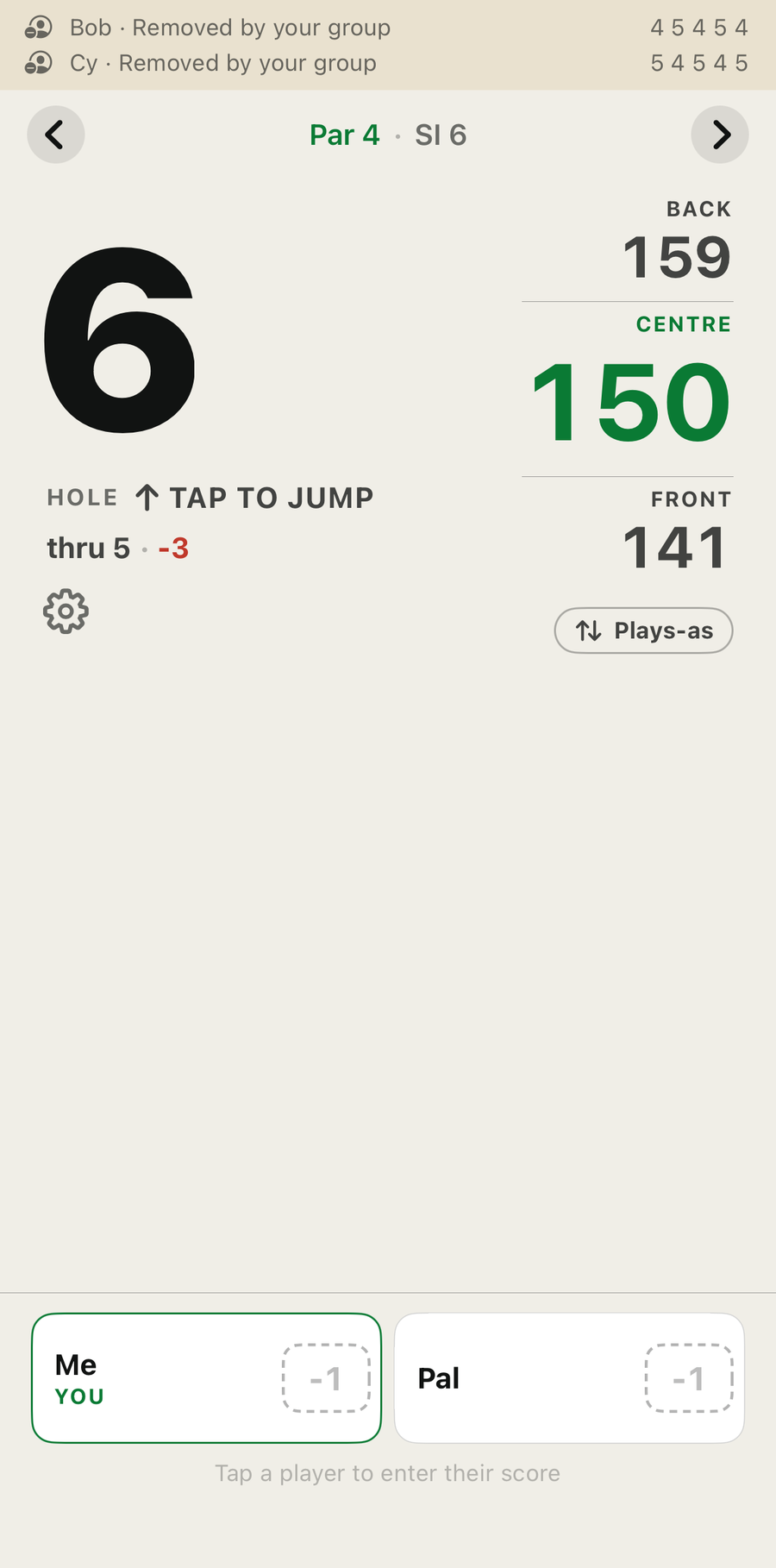
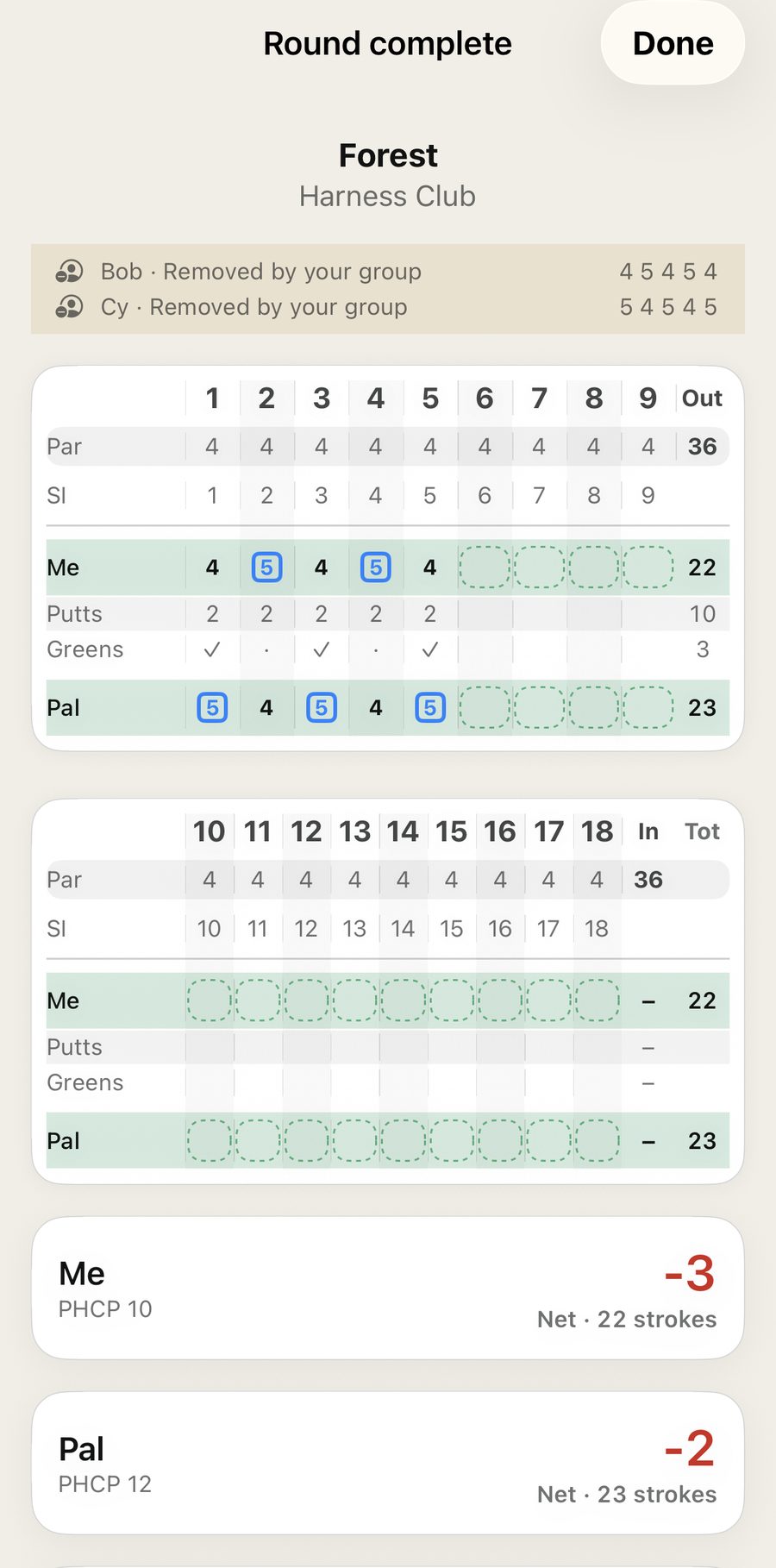
(The Watch's version of this figure is not captured yet.) - A player the group removed is greyed and named in a line that reads Bob · Removed by your group (two removed players give two lines), with their scores beside the name; their scores stay.
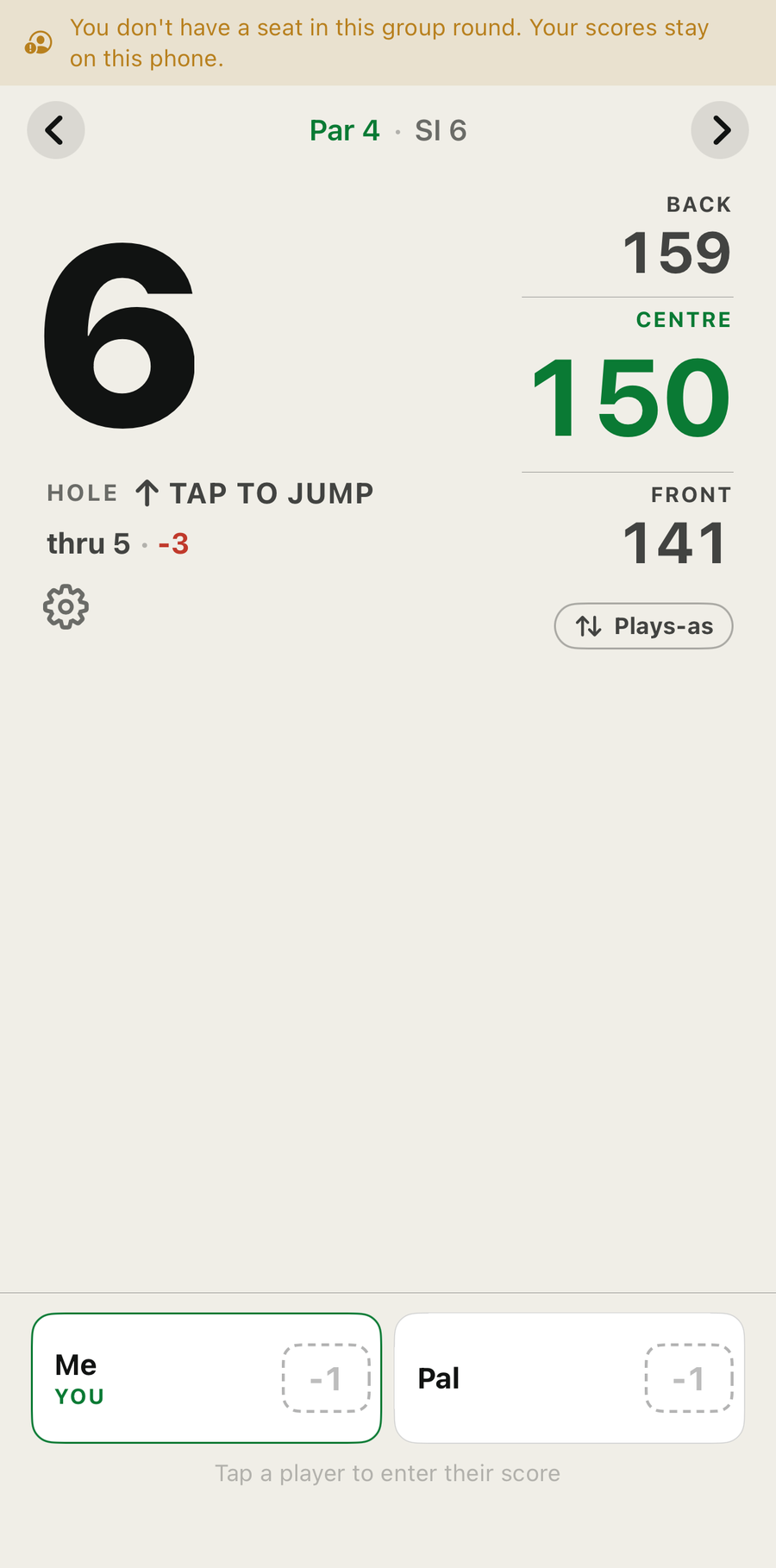
 - If the group has no seat for you. Your own row reads You don't have a seat in this group round. Your scores stay on this phone. Keep scoring: your scores and shots stay on this phone and nothing shows a sync problem for them.
 - A change to the group's setup that cannot be applied (for example from an Edit round sheet opened before the phone knew the round was a group's) is not applied; a line on the Play tab says Add players through your group or This round is set up by your group., and you can dismiss it. Scoring is not affected.
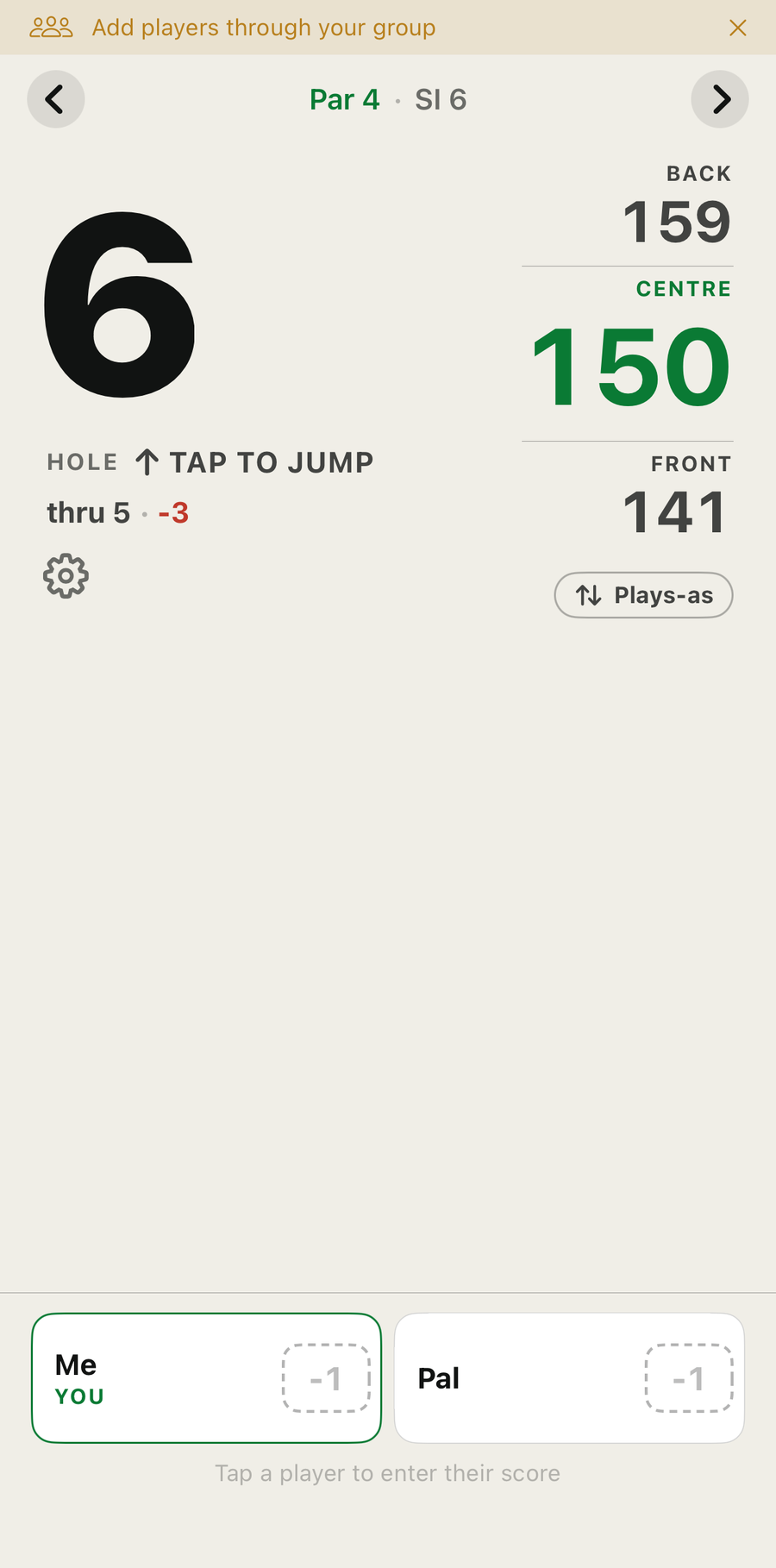
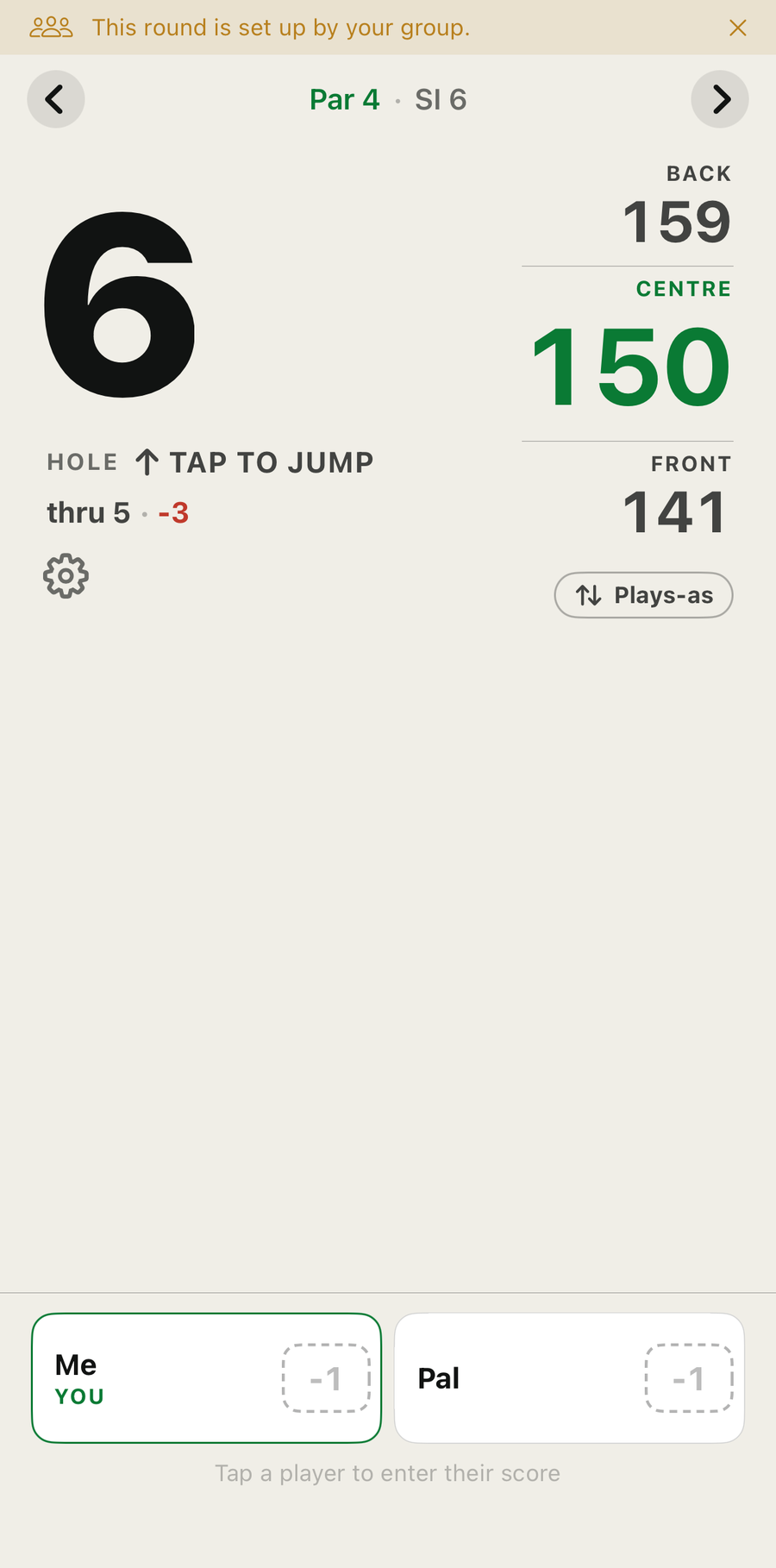 - Update needed. If the group round needs a newer MyGolf than the one you have, the Play tab says Update MyGolf to keep scoring this round with an Update button. Keep scoring: your scores are saved on this phone and sync after the update. Nothing is lost.
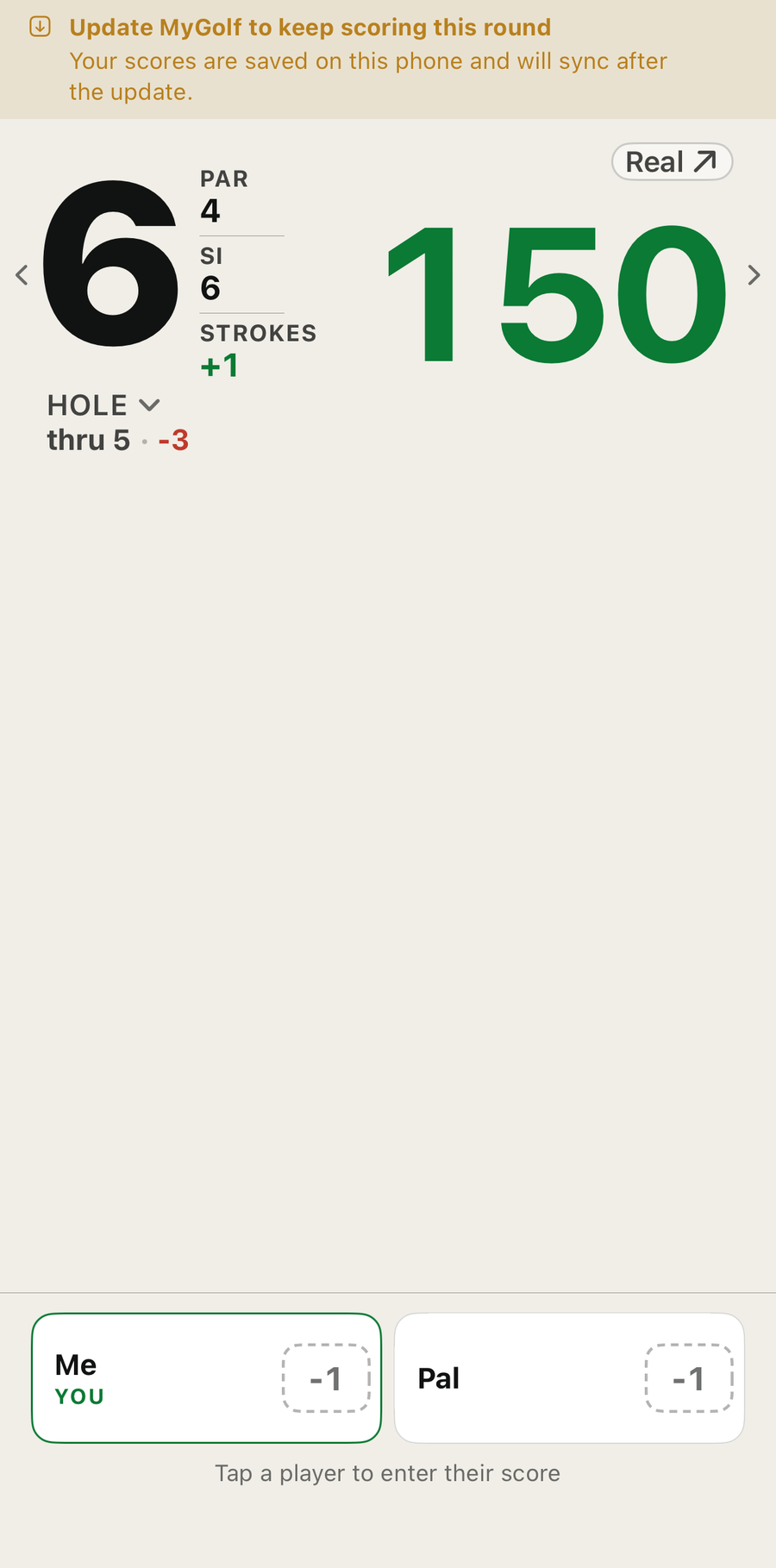
(With no update link configured in the build, the Update button is not shown, as here.) - Sign-in expired. If MyGolf's server stops accepting your sign-in in the middle of a round, you are not signed out: the Play tab says Your sign-in has expired. Sign in again to send your scores. with a Sign in button. Keep scoring: every score and shot stays on this phone and nothing is sent until you sign in again. Sign in takes you to the sign-in screen; after you sign in the round carries on and your scores are sent.
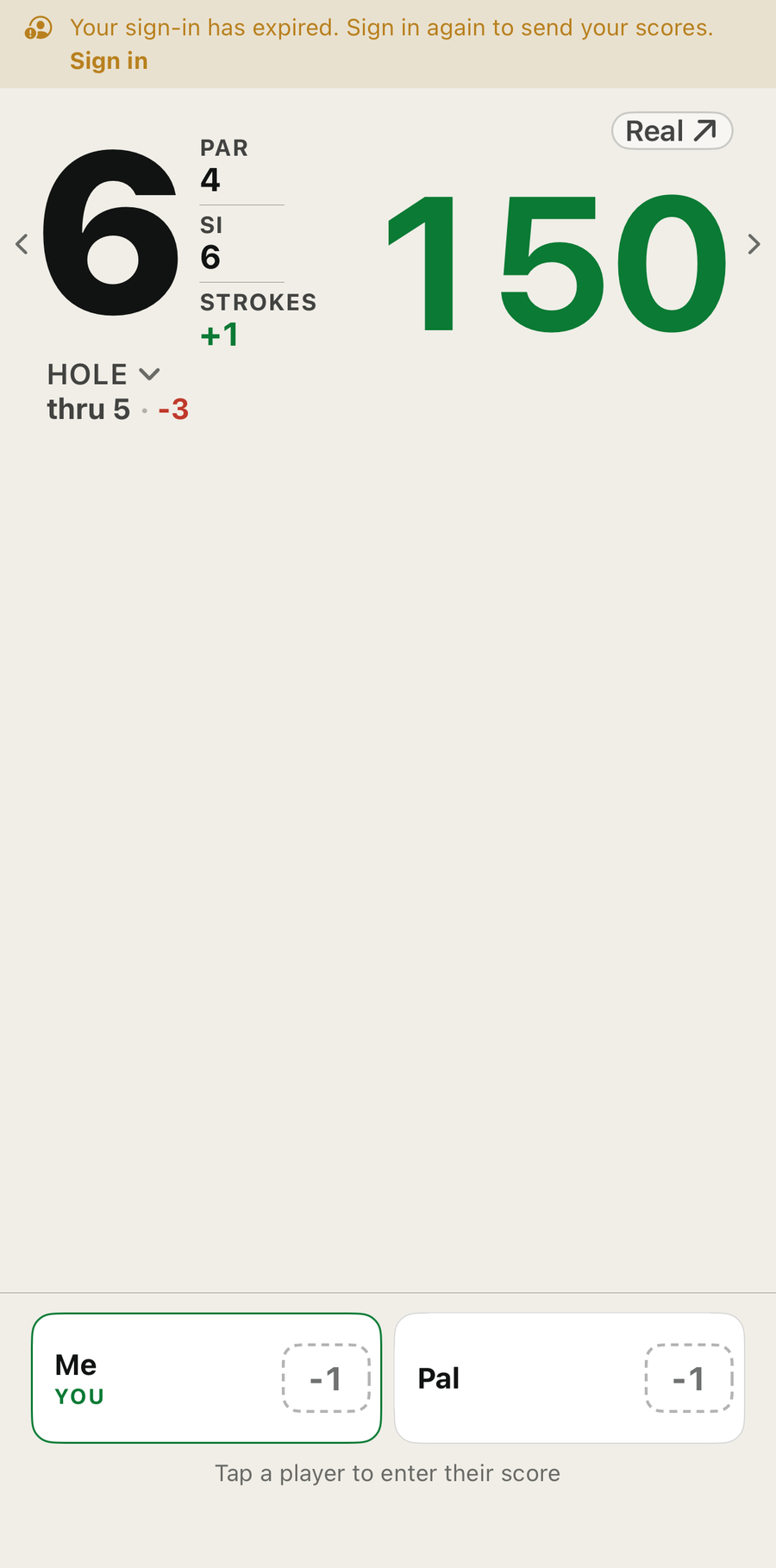 - Leave closes the round on your phone only; your seat and scores stay with the group.